- Joined
- May 1, 2020
- Messages
- 97
- Reaction score
- 11
I think I know the answer but I'll ask just in case.
This is a new system so none of the phones have been provisioned yet, and the are all Yealink T4x phones.
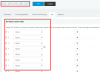
I want two of the buttons to be the same on every phone, with one exception which I will go into later). I don't see any way to do this based on a global setting or a group setting. I can certainly customize the template, but I'm trying to maintain 100% compliance wit 3CX support, which tells me NO custom templates. This leave the only option of setting the buttons on each extension individually. This is more than a little tedious. Is there any way to both deliver this configuration to all phones and still meet 3CX support requirements?
And that one exception to all the phones being the same is a single Hotdesk phone. It pushes down the first button as a logout button. If my custom template for the phone includes buttons one and two, what happens? Does it override button one, or does it shift the other two down to positions 2 and 3?
Thanks
This is a new system so none of the phones have been provisioned yet, and the are all Yealink T4x phones.
I want two of the buttons to be the same on every phone, with one exception which I will go into later). I don't see any way to do this based on a global setting or a group setting. I can certainly customize the template, but I'm trying to maintain 100% compliance wit 3CX support, which tells me NO custom templates. This leave the only option of setting the buttons on each extension individually. This is more than a little tedious. Is there any way to both deliver this configuration to all phones and still meet 3CX support requirements?
And that one exception to all the phones being the same is a single Hotdesk phone. It pushes down the first button as a logout button. If my custom template for the phone includes buttons one and two, what happens? Does it override button one, or does it shift the other two down to positions 2 and 3?
Thanks