- Joined
- Jan 19, 2025
- Messages
- 3
- Reaction score
- 0
Hi everyone,
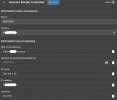
I have set up a 3CX SMB system and I am trying to configure my DECT phone, but the system is not generating the provisioning .cfg file correctly.
My setup includes:
• 3CX SMB,
• SBC installed on Windows,
• Yealink W70B DECT base.
I was able to generate the provisioning file on January 16, but I later had to remove the DECT device because its IP address was blacklisted.
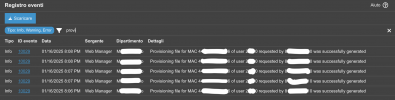
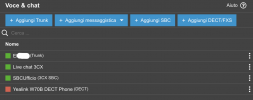
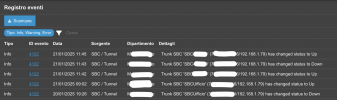
Since January 16, I have created and deleted the DECT device at least 10 times from the “Voice & Chat” section. However, when I check the logs, I can only see the provisioning file that was generated on January 16, and no new provisioning attempts have been logged since.
This morning, I tried the following troubleshooting steps:
1. Uninstalled the SBC,
2. Deleted the DECT device from “Voice & Chat,”
3. Reset the DECT base to factory settings,
4. Reconfigured everything from scratch.
Despite all these efforts, there is still no trace of any new provisioning file being generated in the logs.
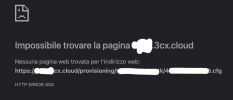
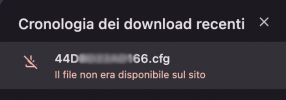
Additionally, I have tried to download the .cfg provisioning file by copying and pasting the link into various browsers (Chrome, Safari, Firefox) both on Mac and on the same Windows machine where the SBC is installed. However, the file is not accessible, and I always receive the error:
“HTTP ERROR 404”
Does anyone have any suggestions on how to resolve this?
Thanks in advance for your help!
Best regards,
Tmunix
I have set up a 3CX SMB system and I am trying to configure my DECT phone, but the system is not generating the provisioning .cfg file correctly.
My setup includes:
• 3CX SMB,
• SBC installed on Windows,
• Yealink W70B DECT base.
I was able to generate the provisioning file on January 16, but I later had to remove the DECT device because its IP address was blacklisted.
Since January 16, I have created and deleted the DECT device at least 10 times from the “Voice & Chat” section. However, when I check the logs, I can only see the provisioning file that was generated on January 16, and no new provisioning attempts have been logged since.
This morning, I tried the following troubleshooting steps:
1. Uninstalled the SBC,
2. Deleted the DECT device from “Voice & Chat,”
3. Reset the DECT base to factory settings,
4. Reconfigured everything from scratch.
Despite all these efforts, there is still no trace of any new provisioning file being generated in the logs.
Additionally, I have tried to download the .cfg provisioning file by copying and pasting the link into various browsers (Chrome, Safari, Firefox) both on Mac and on the same Windows machine where the SBC is installed. However, the file is not accessible, and I always receive the error:
“HTTP ERROR 404”
Does anyone have any suggestions on how to resolve this?
Thanks in advance for your help!
Best regards,
Tmunix