Provisioning Problem

Status
Not open for further replies.

user57659

Premier Customer
Joined
Aug 14, 2019
Messages
20
Reaction score
1
Hello!
I have ran out of ideas on where to look to try and fix this, so hence posing here to see if you can provide any help:

We have a self hosted 3CX instance that runs on its own V-LAN in front of it it has its own PFsense Firewall and all has been well. We are using some old unsupported phones and some custom templates to run them. but I don't think this is the issue.

When I try and provision a phone with the custom template and the Mac address, the phone is not picking up the template at all, but it is getting on the correct network as I can access its web interface fine. 3CX Logs this error as:
Provisioning file /provisioning/42/9c57ad3eb656.xml requested by 10.6.1.207 could not be generated
3CX Template Parser ID: 30040 05/01/2023 15:53:06

As a result I can't add any new phone to the network. I get the same if I try and add a supported phone. The instance we have is running on Debian and I have checked the provisioning folder and there seems to be firmware located where it should be.

Nothing has changed on the network, but I am not ruling out a network issue.

If I go in to the 3cx Interface and try and bring up the provisioning link ( which is a LAN address). it comes up with " page cannot be found "

The existing phones work as they should, but I am unable to add anything new.

Any help or advice would be greatly appreciated.
 
First things first.

Try the provisioning with a support phone and template and report the results.
 
If I go in to the 3cx Interface and try and bring up the provisioning link ( which is a LAN address). it comes up with " page cannot be found "

This error is the result of behavior usually caused by a poorly built or broken custom model.
As @kieferschild suggests, try a “supported phone” with a “non-custom” Template, and let us know if it works. Also, tell us what is the phone model and manufacturer


/provisioning/42/9c57ad3eb656.xml

Please confirm that you have changed the real name of the instance folder to "42" on the forum for RETRACTED (*******), so avoid posting the real name of the "instance" folder and risk getting hacked. Because “42” is not a valid instances folder name

Also, according to the MAC, it's a Cisco phone, correct? Which model ?
 
thanks for the reply. So yes - these are old ( I know are not supported) Cisco SPA's. However, I have got hold of a Yealink T43 U and used the built in template for this. However, I am getting the same issues. The Yealink phone is saying not seeing the config on boot "update skipped". and 3cx says this:
Provisioning file /provisioning/pivr1mm1ygi9ejr requested by 10.6.2.92 could not be generated
3CX Template Parser ID: 30040 09/01/2023 10:36:12

Also the 3CX server is built in Debian
 
Last edited:
We have a self hosted 3CX instance that runs on its own V-LAN in front of it it has its own PFsense Firewall and all has been well.

Self hosted or On-premise ?
If Self hosted, Do you have a VPN?

In order to check the correct operation, try to download the configuration file manually.

For Yealink :
https://{FQDN}:{https port}/provisioning/{random ID}/{Phone Mac}.cfg

Look in Extension > Phone a provisioning TAB to find the Random ID and copy the MAC address
If that doesn't work, investigate.

If it works, try manually upload the downloaded configuration.
 
It's on Premise on its own VLAN, sat behind a PFSense Firewall. Edit: when i try that URL. I am getting a 404 error page cannot be found - can you please tell me where I need to investigate ?

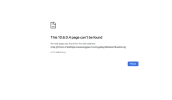
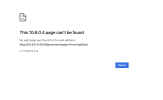
This XXXXX page can’t be found​

No web page was found for the web address: http://x.x.x.x:5000/provisioning/aPNPlRH7LK/805E0CF54E29.cfg


HTTP ERROR 404

( Ive changed some of the response to xxxx. )
 
Last edited:
Hello!
I have ran out of ideas on where to look to try and fix this, so hence posing here to see if you can provide any help:

We have a self hosted 3CX instance that runs on its own V-LAN in front of it it has its own PFsense Firewall and all has been well. We are using some old unsupported phones and some custom templates to run them. but I don't think this is the issue.

When I try and provision a phone with the custom template and the Mac address, the phone is not picking up the template at all, but it is getting on the correct network as I can access its web interface fine. 3CX Logs this error as:
Provisioning file /provisioning/42/9c57ad3eb656.xml requested by 10.6.1.207 could not be generated
3CX Template Parser ID: 30040 05/01/2023 15:53:06

As a result I can't add any new phone to the network. I get the same if I try and add a supported phone. The instance we have is running on Debian and I have checked the provisioning folder and there seems to be firmware located where it should be.

Nothing has changed on the network, but I am not ruling out a network issue.

If I go in to the 3cx Interface and try and bring up the provisioning link ( which is a LAN address). it comes up with " page cannot be found "

The existing phones work as they should, but I am unable to add anything new.

Any help or advice would be greatly appreciated.

Hello!
I have ran out of ideas on where to look to try and fix this, so hence posing here to see if you can provide any help:

We have a self hosted 3CX instance that runs on its own V-LAN in front of it it has its own PFsense Firewall and all has been well. We are using some old unsupported phones and some custom templates to run them. but I don't think this is the issue.

When I try and provision a phone with the custom template and the Mac address, the phone is not picking up the template at all, but it is getting on the correct network as I can access its web interface fine. 3CX Logs this error as:
Provisioning file /provisioning/42/9c57ad3eb656.xml requested by 10.6.1.207 could not be generated
3CX Template Parser ID: 30040 05/01/2023 15:53:06

As a result I can't add any new phone to the network. I get the same if I try and add a supported phone. The instance we have is running on Debian and I have checked the provisioning folder and there seems to be firmware located where it should be.

Nothing has changed on the network, but I am not ruling out a network issue.

If I go in to the 3cx Interface and try and bring up the provisioning link ( which is a LAN address). it comes up with " page cannot be found "

The existing phones work as they should, but I am unable to add anything new.

Any help or advice would be greatly appreciated.
I am getting the same error this morning. No changes to the phone system over the weekend. Provisioning file /provisioning/XXXXXXXX/y000000000000.boot requested by X.X.X.X could not be generated.
 
You are an excellent candidate for 3CX's new StartUP version (including hosting).
You should think about it, everything is key in fully managing and supporting!
It wouldn't be worth it, I'm convinced.
Look here and try free


Alternately , here's where to investigate..
It's on Premise on its own VLAN, sat behind a PFSense Firewall. Edit: when i try that URL. I am getting a 404 error page cannot be found - can you please tell me where I need to investigate ?

This XXXXX page can’t be found​

No web page was found for the web address: http://x.x.x.x:5000/provisioning/aPNPlRH7LK/805E0CF54E29.cfg


HTTP ERROR 404

( Ive changed some of the response to xxxx. )

Try to access the PBX interface login with your computer, with the same url.. without the provisioning part.

If that doesn't work... start by fixing it.. Make sure your PC is in the same VLAN as your 3CX phone server. Otherwise, make sure you allow traffic between your different VLANs

Also, check the "aPNPlRH7LK" portion url, it makes me doubt.
Normally when you do copy paste it should be lower case although that portion of the URL is not case sensitive.
6CF31E80-84CD-442F-979E-5CB5166C17E1.jpeg


I checked on a few PBXs and each of the many PBXs show an 11 character ID, you only have 10 (maybe a coincidence) .
I suggest you validate, especially if it is not copy-paste as my previous remark makes me doubt.


Remark for version 18.6+
In the latest Beta version, in Security > Anti-Hacking , it is possible to make the name of the « instance folder » (Random ID) can be different from one phone to another, then they will have 15 characters (there too I can be wrong on the number of characters, I base myself on the result of my tests).
643D94EC-8EA8-44AE-8CB7-C37B4035F4D2.jpeg
applies to new phone configurations (provisioning), the already provisioned extensions will continue to work (reprovisioning) properly with the existing provisioning link
EC2485D5-71FA-4CDD-B4FB-E7145DF72E8D.jpeg


I don't know if it's enabled by default on new installs, but it's not automatic enabled after an update.


I am getting the same error this morning. No changes to the phone system over the weekend. Provisioning file /provisioning/XXXXXXXX/y000000000000.boot requested by X.X.X.X could not be generated.

Are you encountering such an error or have you just noticed this entering the Log?
 
Hi,
Thanks for your reply.
I can get on to the phone system using just the url and the port and my machine is also connected to the correct VLAN and is fine.

I have updated to this BETA version and enabled that option. However, still the same with trying to provision a new phone. Seems very strange Seeing as the Yealink is a supported phone etc - I thought it should be simple.

After enabling the secret key option - the URL now looks like this:
http://10.6.0.4:5000/provisioning/pivr1mm1ygi9ejr

but that link still gives me a 404 error too.

Also 3cx still throws this up in the event log:
Provisioning file /provisioning/42/805e0cf54e29.xml requested by 10.6.2.104 could not be generated
3CX Template Parser ID: 30040 10/01/2023 10:20:25
 
Last edited:
Also 3cx still throws this up in the event log:
Provisioning file /provisioning/42/805e0cf54e29.xml requested by 10.6.2.104 could not be generated
3CX Template Parser ID: 30040 10/01/2023 10:20:25

the provisioning Link is not good, the Log does not seem to be an attempt from your computer? Is this really the right MAC?
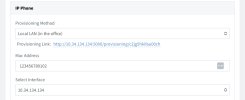
The correct Mac to associate with the URL http://10.6.0.4:5000/provisioning/pivr1mm1ygi9ejr/ In provisioning tab.

If yes, try it

http://10.6.0.4:5000/provisioning/pivr1mm1ygi9ejr/805e0cf54e29.cfg
Are you able to download?

If not,
Everything suggests that your 3CX system is broken or does not meet 3CX recommendations.

Solutions ;
Try free, 3CX StartUP or contact a 3CX Partner for personalized support. Terms and conditions may differ for each of the 3CX partners/resellers.
 
  • Like
Reactions: Evolute IT
Hi,
No still cant access that link that you posted. See screenshots attached
 

Attachments

  • Screenshot 2023-01-10 at 13.14.56.png
    Screenshot 2023-01-10 at 13.14.56.png
    118.2 KB · Views: 14
  • Screenshot 2023-01-10 at 13.15.18.png
    Screenshot 2023-01-10 at 13.15.18.png
    91.2 KB · Views: 13
Hi,
No still cant access that link that you posted. See screenshots attached

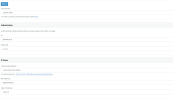
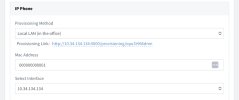
Send me screenshot Tab for Provisioning Phone of extension with this Mac with .. Name phone, Mac ect…
 
Here you go
 

Attachments

  • Screenshot 2023-01-10 at 13.56.08.png
    Screenshot 2023-01-10 at 13.56.08.png
    182.3 KB · Views: 36
  • Like
Reactions: Evolute IT
I must have a corrupt 3cx instance? as it wont open that link either.
 
I must have a corrupt 3cx instance? as it wont open that link either.

3 choices, in my opinion;

- Either the telephone configuration is no longer in the Extension (did you delete the MAC in the extension configuration ? )

- Either you are not on the same network as your PBX and you cannot access the PBX web page with the local iP of the pbx
( http://10.6.0.4:5000/ ) ... TRY full LOGIN...not just access the login webpage... your iP is Blacklisted ?

- Either your installation is corrupted or configured "out" of 3CX recommendations.


** From there, either try 3CX StartUp or request personalized support from a Partner/Reseller .
 
edit : ( http://10.6.0.4:5000/ ) ... TRY full LOGIN...not just access the login webpage... your iP is Blacklisted ?
 
OK - I managed to get a little further. The Yealink phones show up in the "phones" section and they work once they are assigned to an extension from here - but they wont provision if I add them in on the provision tab under the "users" section. However, this is no big deal at the moment as I can get Yealink phones to work if you assign them to an extension from the"phones" section.

However, I can no longer add any additional Cisco SPA phones to the system. (Yes, I know they are not supported). It's the same issue as with the Yealinks, because when I try to add them via the "users" area they won't provision and unlike the Yealink phones don't show in the "phones" section so you can't assign them that way. I am guessing that these old SPA phones are now totally not supported, but our existing estate of theses type phone (over 250 of them) are still functioning as normal with templates working etc.
 
Last edited:
This is not the normal behavior of 3CX PBX.

Everything leads me to believe that.. you don’t save … when you fill this page,
33706F9F-7165-4D84-9B6F-4A0A273F8220.png


Are you sure you save before try the provisioning URL.
Go and see if the MAC is still saved in the extension / provisioning TAB …

If yes, check if provisioning Link is still …/p30rtyght0ytrex

1673520177684.jpeg
 
Status
Not open for further replies.

Forum statistics

Threads
112,293
Messages
591,751
Members
165,427
Latest member
circusduck