Push a URL when a call is received

orlanIMP

Platinum Partner
Joined
Mar 22, 2024
Messages
24
Reaction score
4
Hi,

I am trying to find a way to push a simple URL like this:
http://server.com/phoneNumber=%CallerNumber%&displayName=%CallerDisplayName%

I can do this directly from the PWA (Web Client), using the "Open contact in custom CRM" option. However, this directly opens the URL in the browser, which is not what I want.

I need to send the request silently, without opening the URL in the browser.

Does anyone have any ideas?

thank you
best regard
 
Use the 3CX Windows softphone. You can trigger an EXE with it. Use wget.exe or your own code to trigger the URL with the same parameters.
 
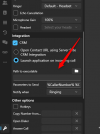
The executable file can do the job in your case:

1739335400488.png
 
Thank for the reply.

but unfortunately the 3CX windows softphone can't be used.

in fact we used the .pwa for a call center, and the big difference between the PWA and the Windows softphone is the possibility to easily log/delog with an account
 
If you can't use the Windows softphone, then the only option would be creating a program using the Call Control API, listen to call events, and triggering your URL when needed. Not a simple task. Here you have some docs:
https://www.3cx.com/blog/releases/v20-call-control-api/
 
i saw it but the server is heberged by 3CX.
So, i don't have any access to the server, and the call control API needed to be installed on the same machine of the 3cx server :(
 
  • Like
Reactions: Evolute IT
Well, another option going back to using the PWA could be that the web page that you trigger is automatically closed after notifying your system. The user would see the new tab opening, but closed immediately after.... You could do that using javascript in the web page that processes this request.
 
Hello.

i tried, and the URL is like "myserver.local". so, the auto close extension from chrome don't work (i don't know why)

i think the only possibilityi have, is to use Call flow design.

something like using the "HTTP request", with session.ani and session.did ..
 
Hello.

i tried, and the URL is like "myserver.local". so, the auto close extension from chrome don't work (i don't know why)

i think the only possibilityi have, is to use Call flow design.

something like using the "HTTP request", with session.ani and session.did ..
Call scripts are executed before the call is even routed so it wouldn't send it upon answer.

The best way is to use the Windows app and use the wget.exe to send the request in the background instead of it opening a webpage.
 
Understandable, because it's simpler—I can directly execute a patch.

However, the application is used in a call center with a universal Windows session.

The PWA has a simple login page, whereas the Windows app does not
 
Understandable, because it's simpler—I can directly execute a patch.

However, the application is used in a call center with a universal Windows session.

The PWA has a simple login page, whereas the Windows app does not
Then CallControl API is your only option.
 
  • Like
Reactions: Evolute IT
Don't know if this is still required but I have found a solution and thought I would share.

In the Windos V20 app under settings, Intergration Check the CRM box and select launch application on incoming call.
Select c:\windows\explorer.exe as the executable.
In Parameters to Send put your URL in double qotes and use the % variables.eg.
"http://server.com/phoneNumber=%CallerNumber%&displayName=%CallerDisplayName%"
The benefit of this solution is that it will use the windows default browser to open the URL on an incoming call.
 
Don't know if this is still required but I have found a solution and thought I would share.

In the Windos V20 app under settings, Intergration Check the CRM box and select launch application on incoming call.
Select c:\windows\explorer.exe as the executable.
In Parameters to Send put your URL in double qotes and use the % variables.eg.
"http://server.com/phoneNumber=%CallerNumber%&displayName=%CallerDisplayName%"
The benefit of this solution is that it will use the windows default browser to open the URL on an incoming call.
This is an option, however it's not a solution for all cases. You should note that this will only be triggered when the call reaches an extension having this configured. This is not a system wide setting. If the call goes to a queue, and no agent takes it, there is no log about it. In those cases, a server side integration is a better option.

Also, your agents will see the browser being launched on every call, and that might not be something you want.

Just to provide some clarity on the pros and cons.....
 
  • Like
Reactions: Evolute IT