Solved QR Code Attachment stripped from Welcome Email since v16 SP6

Status
Not open for further replies.

Brian Buell

Silver Partner
Basic Certified
Joined
Aug 9, 2017
Messages
67
Reaction score
52
The QR Code Attachment is being stripped from the Welcome Email by some Email applications, most particularly Outlook.
I can see it on my iPhone and in Gmail, But Outlook... it just isn't there.

This has happened in past releases and seems to be an issue again with v16 SP6
 
I don't think 'stripped' is the correct wording. Pretty sure if you take a closer look at the message at the top of the email it will tell you the attachments were blocked by Outlook. Adding [email protected] to the safe senders should make them available.
 
  • Yes, I did that the last time this happened. User and Domain in Safe Sender List.
  • No message in the email about Block Attachments either.
It is also difficult to get that message to hundreds of User's that receive the Welcome Email, particularly when the email directs them to scan the QR Code in the email.

Larger Issue: When the user doesn't see the actual "Attached QR Code", they start scanning the IMAGE of a QR Code in the header of the email which doesn't work.

I trust you can see the Tech Support issues this creates.
 
Well we are on Update 6, using 3CX SMTP and Office 365 on the receiving and and everything comes through just fine:

1598654221696.png

There was an issue with the QR code and Office 365 a while back but I haven't seen mention of it since. I did have a user here who wasn't getting the the config attachment but the message stated Outlook was blocking it. Adding the sender ([email protected]) to the safe-senders resolved this.

What is your setup?
 
  • Like
Reactions: Evolute IT
A quick workaround would be to modify the template of the email saying to the user to go and scan the QR Code through the web portal.
 
This might be a lot to do about nothing.
Issue stems from the difference between Cloud and On Prem Servers. The QR Code changes based on how you "Resolve" your Server DNS - Internally or Externally.
Internal DNS will never be resolved through an external lookup.

Moving on...
 
  • Like
Reactions: JohnS_3CX
Hah.. always the little things. Glad you figured it out and thanks for posting the results.
 
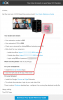
Starting with V16 your QR will appear here and should contain your FQDN.

As before, if this is scanned from the internal network (with an on-premise PBX) and this is not resolvable, you can either correct this using your internal DNS, or use the attached config file by opening the email using your mobile phone. Alternatively you may click the "Inside the office" URL and log into your webclient. From there, clicking on Settings > Scan QR code will generate a QR that has your PBX internal address.

And of course, once provisioned, your phone will learn both the internal and external path so it will continue to work when you are on the move.

1598879443096.png
 
Status
Not open for further replies.

Latest Posts

Forum statistics

Threads
111,962
Messages
589,969
Members
164,864
Latest member
SCarpenter@fifthavenue-la