QR Code

Status
Not open for further replies.

Phil OE

Premier Customer
Joined
Nov 28, 2018
Messages
110
Reaction score
9
Good Afternoon,
Do you have to be on the main network within the office to scan the QR Code to get extensions provisioned? We used to be able to do this outside of the network.
thanks
 
Should work anywhere. Though, I think if you have connected to 3CX using a LAN IP and not its FQDN, it creates the URL/QR using the LAN IP? Log in using the FQDN.
 
Should work anywhere. Though, I think if you have connected to 3CX using a LAN IP and not its FQDN, it creates the URL/QR using the LAN IP? Log in using the FQDN.
Should i be provisioning with the fqdn or the local ip server for new app?
 
I should also say I notice when not connected to the local network it doesnt show contacts or voicemails.
 
  • Like
Reactions: Evolute IT
I thought this was set correctly.I added the internal ip along with the FQDN
1724446238974.png
 
The A for your fake/split DNS zone should be the server's LAN IP.

When you (or the user generating the QR) connect to your 3CX server in your browser, do you use the FQDN?

Basically, don't connect using http://10.10.x.x.
 
The A for your fake/split DNS zone should be the server's LAN IP.

When you (or the user generating the QR) connect to your 3CX server in your browser, do you use the FQDN?

Basically, don't connect using http://10.10.x.x.
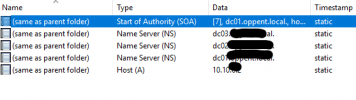
This is what I got in host A
1724446827469.png
 
Right, so does the FQDN work from a web browser inside and outside the office? Your OP:

> Do you have to be on the main network within the office to scan the QR Code to get extensions provisioned? We used to be able to do this outside of the network

...implies that either the QR is using the server LAN IP, or the FQDN isn't connecting from outside the office (firewall/port forward).
 
So I shouldnt have made another zone on its own for my records it should have been under my root zone of my domain if I am understanding correctly.
 
You should create a dedicated zone for your full FQDN and use the "root" record of that zone.

Otherwise it becomes "myname.in.3cx.us.yourdomain.local"
I started to riff on this but I think 3CX has changed the doc page to use the FQDN as the "zone name" which I've posted before is much better, so I agree.

(back to, does it work if you browse to it)
 
So I shouldnt have made another zone on its own for my records it should have been under my root zone of my domain if I am understanding correctly.
No, make a new forward lookup zone.
 
  • Like
Reactions: Evolute IT
No, make a new forward lookup zone.
Which I did do. Host A is the internal IP address along with my FQDN copied from 3cx.
 
Well I did just add my Ip address that was in the setup page of my 3cx portal. Ill give it a weekend and mess with it monday. I hate change sometimes.
 
SO, I have the split dns set up on one of my dc and I can get the phone app to work while on the Wi-Fi but when I go off it does not detect a voicemail or the directory but will allow to make calls.I have went over and over the split dns settings.
 
Does your firewall check pass? (note it will terminate active calls)
 
This was solved by changing a few of the ports that were opened.
 
Status
Not open for further replies.

Members Online Now

Forum statistics

Threads
111,832
Messages
589,283
Members
164,662
Latest member
DejanMDS