Queue auto login

PENGUIN

Silver Partner
Advanced Certified
Joined
Feb 28, 2024
Messages
7
Reaction score
0
Hi All,

I am configuring a PBX with a call queue, the users in which have different starting times. The shifts are 8-4 and 9-5 for example, the users on the later shift are being logged in to the call queue automatically based on the department hours and so are being marked as available to take calls when they are not logged in. Is there a way to disable this auto login behaviour so users have to manually login? Or is there a way around this.

Thanks!
Joel
 
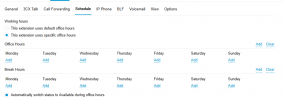
@PENGUIN why dont you setup Office Hours for the Specific Extensions that start later ?
Do they have rotation shifts ? I mean their shifts are not standard ?
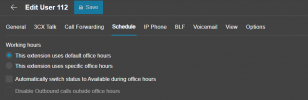
As you can see here there is the option to " Automatically Switch status to Available during office hours " which can be enabled or disabled.


1772788740474.png
 
Hi Nikos,

The hours the staff members work can change from day to day or week to week, they are a non standard pattern. I currently have these options selected on all extensions. When I logged in this morning after bulk adding extensions, I noticed that all of those in a queue were showing as signed in.1772789101641.png

With the above setup, this should now prevent the users from automatically being logged in or logged out of a call queue? I would prefer the users having to do this manually. I have also set the call forwarding behaviour on all extensions so that all but Available/away will log you out from queues.

I appreciate this is a little bit of an odd setup. Could this be an bug/odd behaviour as when I added the extensions to the queues, this automatically set them as logged in to the queue?

Thanks,
Joel
 
@PENGUIN yes with this way the extensions will not change status automatically.
But keep in mind that if the users dont change the status, they will remain available and logged into the Queue/s.
Also ensure that they only change the status, they dont play with login/out from specific queues.
Lets say, login to Queue A but explicitly logout from Queue B.
Then next day complain why Queue B has not logged them in. They have to do this manually since they logged out manually.

For the Login of the agent when adding him/her at the Queue, this is by design.
When an agent is added to the Queue the purpose is to take calls.
Imagine if you add an agent to the Queue and being logged out and then complain why the calls dont come :)
 
Hi Nikos,

Thank you for the clarification! I must have not checked the status of the extensions and assumed they were all automatically logged in. I'll keep in mind regarding users needing to keep on top of logging in / out of the queues.

Thank you :)

Joel
 
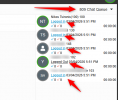
@PENGUIN you may easily have an extension setup as Supervisor to the Queues and from the Web Clinet >> Panel,
you may select the Queue you want and you will see there who is logged in/out.

If you dont want to have you extension, just impersonate the user who is, that simple :)


1772792837669.png
 
  • Like
Reactions: paulodagraca

Forum statistics

Threads
111,832
Messages
589,284
Members
164,662
Latest member
DejanMDS