Queue ends call instantly, when calling it through 3CX/company number, but works when calling it through private number

Peti

Premier Customer
Joined
Jan 20, 2026
Messages
39
Reaction score
6
Hello,

We have queues for our company sites and we noticed, that one of the doesn´t work right. The queue has 2 users, both of them are constantly on do not disturb. In this case should the queue forward the calls to an external number.

When I call the queue through 3CX or my company number, the call ends immediately.

When I cann the queue (exact same number) through my private number, it forwards the call successfully.

I´m not sure yet, but it could be an issue with almost all of our queues.

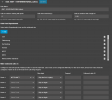
Queue settings:
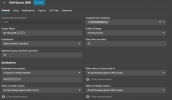
1769066320826.png

Am I missing something?
 
Do you have the outbound rule configured correctly for this number you're forwarding to?

Are you able to dial this number from 3cx?
 
Do you have the outbound rule configured correctly for this number you're forwarding to?

Are you able to dial this number from 3cx?
Looks correctly configured for me :P

Calling it directly through 3CX works
 
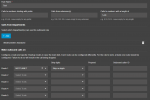
How is your outbound rule configured?
 
  • Like
Reactions: KyriacosS_3CX
How is your outbound rule configured?
msedge_5qCCGvk7Ub.png

I´m not sure why it´s configured to remove the first digit, it was done before I came to the company, people who know why, are not working here anymore. The Department the queue is in is on the list.
 
As @Alphabetic has mentioned, perhaps due to user/department filters different outbound rules are in use when the call is direct or via queue.

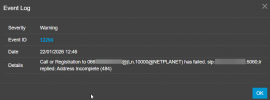
Given that the log line shows a 0 in front of the dialed number, and the rule strips the first one, should that zero had been left there?

In verbose logging you can see the rule being used.
 
As @Alphabetic has mentioned, perhaps due to user/department filters different outbound rules are in use when the call is direct or via queue.

Given that the log line shows a 0 in front of the dialed number, and the rule strips the first one, should that zero had been left there?

In verbose logging you can see the rule being used.
Enabled verbose logging, it shows many lines of logs, no Idea what is what. Tried to change the number of the ofrwarding to start with our countrycode (+43), same error is coming.

Should I try to post the verbose log here?
 
Hi,

Verbose log needs to be very well anonymised before sharing. I would look for lines that include the number you dialed, to see how it travels though the system.
 
what happens if you create a new outbound rule with calls to the full number, send straight to the sip trunk.

send the order so its the first rule
 
what happens if you create a new outbound rule with calls to the full number, send straight to the sip trunk.

send the order so its the first rule
This is the test rule I created, gets me the exact same result:
1769087167895.png
 
Id run a wireshark capture and see what's being sent in the invite
 
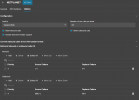
can you screenshot the complete rules list, just blank anything private
 
can you screenshot the complete rules list, just blank anything private
msedge_I9dtgtvs4x.png

The BLOCKED Rule has no routes, that means, that it wouldn´t get ti NETPLANET SIP right?


One other thing I found now is this, don´t know if this is relevant:
1769087467121.png
 
View attachment 50729

The BLOCKED Rule has no routes, that means, that it wouldn´t get ti NETPLANET SIP right?


One other thing I found now is this, don´t know if this is relevant:
View attachment 50730
If it's not in the outbound rule list, its automatically blocked, there's no need to create one specifically for it.

You need to look at a capture to see what's being sent.

the reformat rule for your outbound, assume its made for the international dialing?

if so, you can remove that and do that at the outbound rule level

if number begins with 000, remove 1

also, have you got a caller ID specified?
 
@Peti ,

Of course you can see if the forum members can help you, but if this is a business impacting issue I see two parallel paths forward, especially since your Trunk provider is not a supported one.

Get a packet capture, send it to your Trunk provider and see if they can help guide you ro a fix. Perhaps share the information they give you here if you wish, maybe the solution is obvious at that point.

Also you can seek out a 3CX Partner, a list by location is available on our site if you prefer someone local etc, and have them help sort out the issue and offer ongoing support.
 
if so, you can remove that and do that at the outbound rule level

if number begins with 000, remove 1
Hmm, the outbound rule has - if starts with 0, remove first digit - so maybe when the rule is matched and then the reformat kicks in as well the outbound ends up as 0xxxx whenit should be 00xxxxx ?
 
Hmm, the outbound rule has - if starts with 0, remove first digit - so maybe when the rule is matched and then the reformat kicks in as well the outbound ends up as 0xxxx whenit should be 00xxxxx ?
It should be 0xxxx
 
Try taking out the outbound reformat and check your caller ID
 

Forum statistics

Threads
112,149
Messages
590,964
Members
165,170
Latest member
SupportRock