Queue issue caused byTeams presence not changing in 3cx when user logs out

ergcb

Customer
Joined
Jun 13, 2024
Messages
9
Reaction score
0
Hi,

I have a queue that is using skill based routing and all the agents are using teams. The issue I have is that during the day everything is fine & the queues react to the presence of the agents as they go about their day in teams. However when the users logout and shutdown at the end of the day, they remain available in 3CX. the issue is then that when a call comes in it tries to poll the agent who is offline and it causes a loop. Is there anything we can do to prevent this?
 
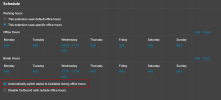
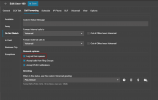
You can change the 3CX status based on the time of the day, so when its their time to go home, they can change to DND and then consequently log out

1730213228407.png

1730213244058.png
 
You can change the 3CX status based on the time of the day, so when its their time to go home, they can change to DND and then consequently log out

View attachment 44803

View attachment 44804
Thanks for the idea. However I assume you are saying they should change to DND or will this change it for them. If I change their status m as soon as they are logged into teams , it updates again, its only when the shut down for the day I have this issue where they stay available. We also have shifts so they are not on the same shift each day.
 
Thanks for the idea. However I assume you are saying they should change to DND or will this change it for them. If I change their status m as soon as they are logged into teams , it updates again, its only when the shut down for the day I have this issue where they stay available. We also have shifts so they are not on the same shift each day.
This will change it automatically for them.

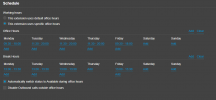
I'm in the same situation, my hours change from week to week according the to the webinar schedule.

1730281301219.png
 
  • Like
Reactions: Evolute IT
Ok I will give this a try. My only worry with this is if an agents works longer than the shift , It will change back to available would it not?
 
Hi, This helps a but you have to change the hours daily as they work different shifts on different days. It is also an issue no with Ring groups. The same thing happens and you get a loop if members of the group have shutdown teams and they are the only one showing as available.
 
Witht he Ring Groups you can also not receive the calls.

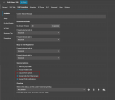
1730712244421.png

You can configure this under the users forwarding rules.

but you have to change the hours daily as they work different shifts on different days.
I personally do this on a weekly basis.
 
This is all good workaround advice. But what I do not understand is : why 3cx does not reflect the user as being offline. It seems a little short-sighted.
 
This is not actually a work around. The functionaliy to change the status of a user is provided specifically for this purpose.

The user might have an IP Phone configured on their extension. This would cause the user to be still registered on their extension. They might have a 3CX mobile app which is still registered via PUSH.

The status change can either come from the user using a schedule, them changing their status, or getting a signal from the teams client.

In version 20 the web client also utlises PUSH in order to get notifications which is why it still remains as available as well.
 
  • Like
Reactions: Evolute IT
Yes , but they do not have a desk phone , they are not using the web clients and they do not have the desktop client. The other thing is that I did not have this issue in V18 at all. Hence why the calls loop. because there is no other client active to push the call to.
 
If 3CX doesnt receive a change of status from the Teams client then we have no way of knowing it is offline. They would need to implement the hour schedule of the agents.

If you have the schedule posted somewhere then you could implement an API connection to the PBX to update the users times based on this every weekend for the next week.
 
  • Like
Reactions: Evolute IT
You need to use a 3CX client or IP phone to utilize the 3CX queue features. Teams only client is not supported.
 
  • Like
Reactions: Evolute IT
You need to use a 3CX client or IP phone to utilize the 3CX queue features. Teams only client is not supported.
This affects ring groups as well. But of course there is a way out of that I have just set it to ring all on no answer and that seems to resolve it. This is only since the fully synced presence. Before we had the ring groups ringing even if the users was busy & only meetings were blocking the call being offered. Now if all are busy and you have one user that is offline but showing as available in 3cx it causes the issue. I get what you say about the queues not really being supported. But it does work OK apart from this. Can I stop queue agents syncing presence though separately? So syncing both ways helps the team's users see the presence. To sum up, will having the Q agents use 3cx for their calls solve this? Because if they also use teams for the communication with the rest of the business will I still have the same status issue on shutdown. Or are we saying that all Q users should not be configured for teams calling ?
 
3CX is not meant to be used as a backend to teams clients. In that case just use Teams queues

The whole scenario is not supported and will not work over time
 
  • Like
Reactions: Evolute IT
Fair enough , but I do not see why you bothered to integrate it TBH. I mean how do customers use it in a mixed environment if it really cannot cope with it.
 
Its meant for 3CX users to be able to call Teams users and vice versa. This is why we support direct routing. In terms of office teams integration for status this is another matter, this is as part of our office integration
 
Hi Nick , but The integration allows PSTN inbound calls to route inbound & outbound . With even greater integration with presence since version 20. If it is a limitation from the teams API that it does not transmit Offline, then I get it. What I can say is that in a deployment of our size it works well as the only client, with the queue issue as the main exception. I can resolve any other issue in ring groups simply by routing them out to ring all should they all be busy. It is just that one status of offline , that keeps the user as available. Would be good to find a workaround.
 

Forum statistics

Threads
111,956
Messages
589,928
Members
164,861
Latest member
LewisJC