- Joined
- Apr 8, 2020
- Messages
- 19
- Reaction score
- 2
This affects both v16, v18 on prem and cloud hosted, ios and android. (tested)
Scenario:
Our Client has 16 mobile only users (no computer) who are in a queue they login and out frequently due to their job.
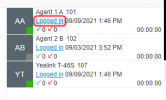
IF a user or a manger signs a user out of the queue via the 3cx web interface, the user’s mobile device does NOT update they are logged out of that queue. IE it shows they are still logged in. IF they LOG Out from the Cell phone,(after already being logged out from the web app) and log back in on the phone, the phone app shows they are logged into the queue but the pbx does not register that they are in the queue.
It gets weirder.
If you have 2 mobile devices and the v16 desktop app signed in, and a user/manager has logged the extension out of the queue in the cloud, pressing the queue button, on ANY phone or the windows desktop app (not the NEW v18 app) it “logs out/in” on all devices accept the PBX.
AS you can belong to more than 1 queue, I can kind of see some logic on this behavior. However, if you only belong to 1 queue, the queue button on any softphone should login/out of the queue belong to regardless of where or what device you did it from.
The fix I see would be to add a drop down or option when the queue button is pushed that a) confirms with the system what queues are active and allows the cellular app to select them.
For now the work around given was to ONLY login/out via the web console.
Scenario:
Our Client has 16 mobile only users (no computer) who are in a queue they login and out frequently due to their job.
IF a user or a manger signs a user out of the queue via the 3cx web interface, the user’s mobile device does NOT update they are logged out of that queue. IE it shows they are still logged in. IF they LOG Out from the Cell phone,(after already being logged out from the web app) and log back in on the phone, the phone app shows they are logged into the queue but the pbx does not register that they are in the queue.
It gets weirder.
If you have 2 mobile devices and the v16 desktop app signed in, and a user/manager has logged the extension out of the queue in the cloud, pressing the queue button, on ANY phone or the windows desktop app (not the NEW v18 app) it “logs out/in” on all devices accept the PBX.
AS you can belong to more than 1 queue, I can kind of see some logic on this behavior. However, if you only belong to 1 queue, the queue button on any softphone should login/out of the queue belong to regardless of where or what device you did it from.
The fix I see would be to add a drop down or option when the queue button is pushed that a) confirms with the system what queues are active and allows the cellular app to select them.
For now the work around given was to ONLY login/out via the web console.