Solved Receptionist View NOT Working

Status
Not open for further replies.

chubbs

Forum User
Basic Certified
Joined
Dec 30, 2020
Messages
18
Reaction score
2
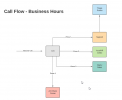
Ok I have poured over the documentation, this problem must be right in front of my nose so I can't see it. I have an IVR setup as below:
1610055819111.png
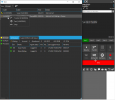
I need to have Susan be able to pickup, transfer, hold, etc calls into the Support & All Others queues but no matter what I can I can't find the setting to allow her to do so. They make it look so easy in the videos.
1610055445125.png
I have given that user Manager rights on the Default group.
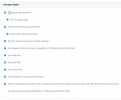
1610055553296.png

Can someone please point me in the right direction. Thanks.
 
Is Susan a member of the queue? I believe in order to 'cherry pick' she would need to be a member of the queue but not logged into the queue (and also not actively on a call).
 
Yes Susan is a member of the queue which receives the initial inbound calls off the IVR. If she's not logged into the queue her phone wouldn't ring...right? In my testing, when a second call comes in, I'm able to put the call on hold but not answer the second call, transfer, etc. I'm missing something somewhere.
 
Have you tried adding Susan as a "Queue Manager" in the specific Queue(s)? If I am undersatnd it correctly, that should do the trick.
 
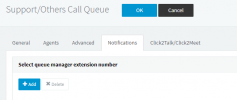
Here?
1610392794483.png

It's under notifications though.

Ryan
 
Ok so I think we're getting somewhere now. I finally have the option to transfer, park, etc; but I don't have the ability to answer a call via the right-click.

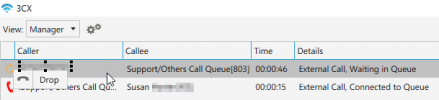
In the pic below I have one call on-hold, when I call in with a 2nd call you can see I don't have the options answer the call like the video shows. I allows me to park, transfer, drop.

1610396848146.png

Am i missing understanding what the video showed?

Professional Call Management with the 3CX Switchboard​


Thanks.
 
The "Pickup" option appears when you right-click on a call that is ringing a Queue Agent.
In your screenshot, the call you can right-clicked is waiting in the Queue, not ringing an actual extension.

But to do what you need, just go the Extension Settings of Susan's extension and under Forward Rules, check option "Accept multiple calls".

Once you have done this, you can right-click on a call waiting in the Queue, press "Transfer" and type in your own extension (transfer to your self).

The call will leave the Queue and be redirected to your extension, and because you can now accept multiple calls, it will ring your extension, even if you are on another call.
 
That option is already checked.
 
Ok, then what happens if you press the "Transfer" option, then type in your own extension?
FYI, I double-checked this before I sent it to you. If everything is done as explained, you should see a second call ringing on your "Line 2".
 
Ok that methodology works, seems very clunky though. I was hoping you could just right-click on the 2nd call, select answer and take it that ways as that's what I thought the video was showing us.
 
Status
Not open for further replies.

Forum statistics

Threads
111,974
Messages
590,081
Members
164,899
Latest member
mazet