Recording a prompt for a digital receptionist (v20)

Status
Not open for further replies.

Fernando Colabuono

Silver Partner
Advanced Certified
Joined
Mar 24, 2017
Messages
3
Reaction score
2
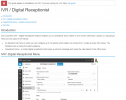
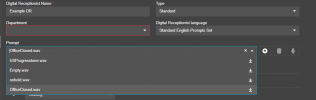
I'm testing a v20 on prem pbx (upgraded from v18) and I don't see a record option for the prompt in the digital receptionist settings. The documentation shows a record button next to the prompt selection box, but my install doesn't have that option.
Image from docs:

1701802546034.png

My install:
1701802620780.png

Does anyone else see this?

Thanks,
 
Link to the doc?

That's a v18 option, v20 doesn't have that button.
 
  • Like
Reactions: Evolute IT
  • Like
Reactions: Evolute IT
Make sure you've got a headset showing under audio/video or an IP phone registered to the ext youre logged in as and it will show.
 
Once I allowed the web page to access the mic the record button appeared as @kieferschild suggested, but I can only record using the computer mic. I don't get an option to record from an IP phone (the system owner extension has a phone provisioned), or the option to send the recording to a user's phone. When logged into a user extension I can only record greetings using the computer mic.
If this is the general experience then I'll put it down to a Beta bug that will fixed in the general release version.
 
  • Like
Reactions: Plains_JosephW
Make sure you've got a headset showing under audio/video or an IP phone registered to the ext youre logged in as and it will show.
Huh, did not know that. Thanks for sharing.
 
  • Like
Reactions: grizly and jed
I don't get an option to record from an IP phone
Hmm, we've used that a lot for less complicated call trees, where we are in the management console and send the call to the person making the recording.

If the person has a mic they could use Audacity or something else to make the recording, and it looks like there's still an import/upload button on that page. Could they record it from their web client (Settings/Greetings) using their phone and them Download it?
 
This would be an ideal feature to bring back. Surrounding sounds are too much when coming from a mic on a laptop and external mics are not a common thing to find in the wild. Not to mention when a snow storm hits and the user is at home. The ability to change greetings at will as needed without having to stage a recording studio is completely lost. Bit of an exaggeration but point stands. Being able to direct your recording source, even if its to the mobile app, is a difference maker.

The upcoming deployment and training session for a client with 4 offices to manage will surely have a sour tone on this item. I can hear it now, "I have to buy a mic and take it home with me!?!?" "All I had to do was XYZ on the 20 year old system"

Receptionists are the most heard and if they are not happy..... well :)
 
Workaround that doesn't exactly solve the issue as nicely is to have them call a voicemail box that emails them the wav file. Then upload it.

They can use any phone to do it and the recorder doesn't even need to the uploader.

Lastly, you can still stage greeting and switch them on the fly...
1702417874920.png
 
I agree on this one, this feature was a must. Want 3CX to bring it back.
Using computer mic bring us back 20 years ago in audio quality for prompts.
Until then, i'll try SweetAction's suggestion.
 
I noticed this in v18. I am sad that the option to record the prompts from the IP phone is gone. It does make it difficult for receptionists to update their prompts unless they have a really good headset already linked to their computer.
 
Last edited:
  • Like
Reactions: david90
Great idea @SweetAction

This feature is a must have for many of our clients. Our clients also, do not have headsets or mics attached to their workstations but do have VOIP desk phones.
 
+1 to please bring this feature back. This is the main way my customers record their automated attendant greetings.
 
+1 to this for us too, fairly important part for our EUs.
 
  • Like
Reactions: david90
+1 from us also. We have clients that change greetings weekly to let there callers know what the specials are on the menu this week. Lots of restaurants as our customer base
 
Same thing here. This is a problem in many cases.
 
Same thing here too ..
 
  • Like
Reactions: david90
+1 to bring the feature back as we use it alot for out phone system
 
Same here, really miss that feature.
 
Until we get this feature back hopefully, I will use amazon text to speech, convert and then upload.
 
Status
Not open for further replies.

Latest Posts

Forum statistics

Threads
111,972
Messages
590,066
Members
164,888
Latest member
Tim Cook