Recording Issue

Status
Not open for further replies.

andy.cumming@purplecomms.

Gold Partner
Advanced Certified
Joined
Mar 30, 2023
Messages
15
Reaction score
4
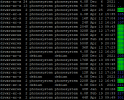
3CX version 18.0 (Build 908). There is one user that doesn't have any recording files. We are self hosting on OVH. I have used putty to SSH and can see the following. The Ext with no recording files is 208.
1681376735337.png
 
Hi,

Looks like some folders (including 216 and 221) were manually modified and dont have the correct rights and ownership.

"phonesystem" cannot write to them and thus the issue you described.

You have to give them the same owner and rights as the healthy folders have, and avoid making any manual changes via SSH in the future.
 
I wasn't aware we had made any changes to be honest. Is it easy to change the owner and rights?
 
Hi Andy,

Very tricky subject! While one could easily google it and and type a few commands in, we strongly advise against touching anything in SSH and we consider modified linux system as not eligible for support (for good reasons of course, not a decision we took lightly).

The terminal is a bit TOO power if you know what I mean, and 3CX really does rely on an unmodified system to function correctly.

Personally if had doubts about my machine's integrity, I'd get a full backup, scrap the VM and redeploy a fresh one and restore my backup just to be on the safe side. At this point it's entirely up to you :confused:
 
I might try deleting the extension and re-creating it.
 
Status
Not open for further replies.

Forum statistics

Threads
111,974
Messages
590,081
Members
164,899
Latest member
mazet