Registration

Status
Not open for further replies.
Extension 801 had Sip ID of 801?
 
Extension 801, authentication ID=801, password = "blank" i.e. no password.

I've uninstalled 3Cx version 7.1, run cleanup utility, deleted 3CX folder. Installed 3CX version 7.1, fresh configuration no restore.

Created extension 801 - no problem with authentication ID = 801 and no password. Extension registered.
Created extension 802 - no problem with authentictaion ID = 802 and no password. Extension registered.
Tried to create extension 803 and 804 and get the message please enter valid values for SIP ID
Haven't even tried to confifure VoIP lines, disabling STUN etc.
 
What do 803 and 804 have as values of Sip ID?
 
Extension 803, authentication ID= 803 password = blank

Extension 804, authentcitaion ID= 804 password = blank

Exactly the same method as used for extensions 801 and 802.

Authentication ID = extension number, password = blank (no password).

Works fine for first two extensions, they are registered.

Any subsequent attempt to create extensions returns the same message about valid SIP values.
 
I asked you "what are the SIP ID VALUES for 803 and 804 set to by default? after it gives you the error? "

Also - You did exactly everything I suggested not to do. And you did nothing from what I suggested you to do. We are going nowhere like this.

Backup - not sent
Logs - not sent
Forceauth = 0 not set
Told you to change nothing in the configuration - You uninstalled everything again.

How can I work like this? Send me a backup - Im not going to answer any more questions.
 
I made one simple change to a previously working version and that has 'hosed' everything, nothing works any more.

I know this is a free edition and I know I'm not paying for support but you rely on good feeedback from the Free Edition to generate sales, otherwise why make a Free Edition available?

What I'm trying to do is get a remote office in Iraq back up and running, thats all, period.

If you don't want to help thats fine, I'll either figure it out myself or with the help of other forum users that aren't affiliated to 3CX.

I've explained to you that the rmote system is in Iraq, not the UK, not the USA and not Cyprus. There's no one at the remote site with any technical skills that can help.

Forget about all the changes and look at it as a fresh installation. Two extensions were created successfully but any attempts to create more using excatly the same methodology failed, why is that?
 
We never said that we don't want to help you - Actually we have been answering you with a delay of 5 minutes - and the interest in your problem was evidently shown.

If you get the SIP ID errors it means that the sip id numbers are being used somewhere else.

When you change the number of an extension, you have to change the extension number, auth, ID and password and Also the SIP ID.

In the next build these wil be changed automatically.

But it could be that the first extension you created has SIP ID of 100 (because this was not changed) and the 3rd Extension you creeated will also Have SIP ID of 100. Because the first offered Extension is 100. You are changing 100 to 800 range (because you want them like this BUT THE sip id is remaining 100 just the same.

This is why it is not letting you create an extension. The next build will change all the entries. In the meantime you have to make sure that Each SIP ID for Each extension is unique.
 
And a Small Guide:

I'm guessing you have at least some access to the Management Console...

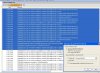
1) To Copy Logs.
Go to Advanced Settings, set Log Settings to Verbose. Then Restart the 3CX Phonesystem.
After the Restart go to the Logs Page
From here Click on the First Line, then Hold Shift and Click the End of the viewable logs.
Attached an Example.


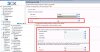
2) To change the FORCEAUTH Value.
Go to Advanced > Custom Parameters and find the Parameter that says FORCEAUTH:1
Then Change the 1 to a 0.
Also attached another screenshot


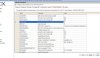
3) To Find the SIP ID
See the Following Screenshot.
 

Attachments

  • Howto1.JPG
    Howto1.JPG
    195.5 KB · Views: 1,205
  • Howto2.JPG
    Howto2.JPG
    115.6 KB · Views: 1,206
  • Howto3.JPG
    Howto3.JPG
    107.2 KB · Views: 1,206
  • Like
Reactions: Ankit
Actually the best thing is to click on HELP at the top and click on Generate Support Info.

Send the file as attachment or directly [email protected].

This will have the backup and everything as well as the logs.

Sorry if we did not make this clear earlier.


`
 
  • Like
Reactions: Ankit
I have sent you an email with step by step instructions what needs to be done. Please follow them and get back to me.

Also for users experiencing registration problems (which were not apparent before) consider doing the following.

There is a setting called NONCEEXPIRATION - by default this is 1.

Consider increasing this to 5 seconds. We will make a blog post to explain how this works exactly.
 
  • Like
Reactions: Ankit
Do you have feedback on this case? How are things going?
 
  • Like
Reactions: Ankit
Status
Not open for further replies.

Latest Posts

Forum statistics

Threads
111,885
Messages
589,545
Members
164,744
Latest member
johnblackwood1