- Joined
- Apr 9, 2019
- Messages
- 3
- Reaction score
- 0
I performed an initial install of 3CX on Debian, then discovered you could not change the IP after configuration was complete.
Wiped out the install and started over.
I then configured 1:1 NAT in order to have the correct external address and set the static IP during installation.
This meant that on my second install, the IP address was different Both on the public and private side.
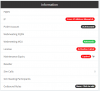
Now I have the following errors on the dashboard information tab.
"Error: IP Address Mismatch"
"License Activation Failed"
"Maintenance Expiry Expired"
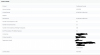
however, in the License Settings it says "License status Activated"
I've tried re-applying the settings on their respective pages, and the details look correct for each, just the status Panel is reporting false readings (I think)
has anyone seen this before, or have any suggestions to fix the status panel?
Wiped out the install and started over.
I then configured 1:1 NAT in order to have the correct external address and set the static IP during installation.
This meant that on my second install, the IP address was different Both on the public and private side.
Now I have the following errors on the dashboard information tab.
"Error: IP Address Mismatch"
"License Activation Failed"
"Maintenance Expiry Expired"
however, in the License Settings it says "License status Activated"
I've tried re-applying the settings on their respective pages, and the details look correct for each, just the status Panel is reporting false readings (I think)
has anyone seen this before, or have any suggestions to fix the status panel?