Remap Sidekey

sonnyh1

SOHO User
Joined
Jan 18, 2023
Messages
112
Reaction score
16
Hi,
I have several Fanvil phones.
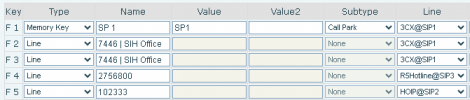
Sidekey 2 & 3 are usually mapped to SP1 Line.
I can go into the phone GUI and add SP2 as a different trunk, and set it up as Sidekey 4.
When the phone reprovisions/updates Sidekey 4 is overwritten.

How can I modify the template for this phone so Sidekey 4 SP2 is not overwritten?
 
Set the BLFs in the web client or admin interface.
 
Set the BLFs in the web client or admin interface.
I set it in the webclient, but it is overwritten when updated.
Also, the admin interface does not allow selecting a specific line. Defaults tp SP1
 
Oh are you looking for a line key? I thought you meant shared parking. Are you selecting Line?
https://www.3cx.com/sip-phones/busy-lamp-field-dss-keys/

Or use an outbound rule to have a prefix to use an alt trunk, when dialing.

The phone should always be overwritten when it reprovisions.
 
Selecting a line.
I have 2 other trunks that I want to have Sidekeys for, that won't be overwritten.
 
So just to be super clear, you're setting the BLF key in the 3CX web client and it is not set on the phone, after a reprovision? Can you show a screenshot of the BLF page in 3CX?
 
So just to be super clear, you're setting the BLF key in the 3CX web client and it is not set on the phone, after a reprovision? Can you show a screenshot of the BLF page in 3CX?
1753722494070.png
 
That looks like the phone, not 3CX. See:
1753723293247.png

3CX will always overwrite something you manually set on the phone.
 
  • Like
Reactions: Evolute IT
That looks like the phone, not 3CX. See:
View attachment 48788

3CX will always overwrite something you manually set on the phone.
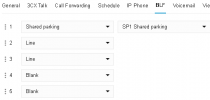
Here is the 3CX:
1753731491011.png
$ & 5 is where I would like the other 2 lines to show. That way I can monitor the status with the BLF
 
Here is the 3CX:
View attachment 48789
$ & 5 is where I would like the other 2 lines to show. That way I can monitor the status with the BLF
You will need a custom template to accomplish this. OR, remove the provisioning link from the phone and stick to local phone configuration only.
 
  • Like
Reactions: Evolute IT
You will need a custom template to accomplish this. OR, remove the provisioning link from the phone and stick to local phone configuration only.
That was my original question, how to setup a custom template.
Guidelines, etc
 
I must be missing something. Where are the variables stored that the template references?
In 3CX. Take for example

Code:
{IF blf19}
linekey.19.line = %%Line%%                         
linekey.19.value = %%type%%                       
linekey.19.pickup_value = %%PickupValue%%                 
linekey.19.type = %%DKtype%%                                     
linekey.19.label = %%label%%
linekey.19.extension = %%PickupValue%%
{ELSE}

This states that if BLF19 is defined on an extension, that it will dynamically set the label on the BLF to what's defined for the label in the 3CX admin panel.

And before you ask, yes, you can make your own variables and reference them in the template. Parameters section of 3CX allows you to define the name and specify the value and the format you could use it is %%param::myvar%%
 
In 3CX. Take for example

Code:
{IF blf19}
linekey.19.line = %%Line%%                        
linekey.19.value = %%type%%                      
linekey.19.pickup_value = %%PickupValue%%                
linekey.19.type = %%DKtype%%                                    
linekey.19.label = %%label%%
linekey.19.extension = %%PickupValue%%
{ELSE}

This states that if BLF19 is defined on an extension, that it will dynamically set the label on the BLF to what's defined for the label in the 3CX admin panel.

And before you ask, yes, you can make your own variables and reference them in the template. Parameters section of 3CX allows you to define the name and specify the value and the format you could use it is %%param::myvar%%
Thankyou.
Is the general template construction/mapping available any there?
 
Thankyou.
Is the general template construction/mapping available any there?
The only official documentation that I can share is the link above.
 

Forum statistics

Threads
111,957
Messages
589,929
Members
164,861
Latest member
LewisJC