Remote Agents unreliable call quality (might need pro help, happy to pay)

Status
Not open for further replies.

Colin911

Premier Customer
Joined
Dec 9, 2018
Messages
80
Reaction score
5
Hello,

I have a self hosted 3cx pro in my office. We're not a big setup only 8 sim calls. We're in the Caribbean.

The vast majority of our calls are linked to a local SIP provider coming through an existing fiber connection to us with the local ISP. The isp give us a SIP trunk and a lite version DIA through this fiber connection. I use the DIA connection exclusively to run calls on (and of course also as a backup internet connection for the office in case the main one goes down.

The whole setup works well in our office. And, most of the time, our remote agents that need to take calls that are located in the US an even the Philippines are able to get in and make calls to the local SIP trunk too. We have a Call queue that they need to pick up when customers call.

The problem I'm having is that on occasion, the call quality to the remote team is just not good enough. When the call quality issues happen, the internet connections on both side seem to be working just fine. Neither are overburdened or have high latency from what I can tell.

I ran pingplotter for a few days between the connections and on the problem days I did see a slight higher latency despite the connections on either side seemingly working fine.
Am I expecting too much to have agents in the Philippines connect to a PBX in the Caribbean? Some part of me suspects there are too many hops for the connection to the other side of the world... Are there more dedicated "routes" for traffic that could help this scenario out?

There are a ton of possibilities to troubleshoot here and while I know my way around computers, I'm in no means very savvy on VOIP once I have to look under the hood at code. Posting here to see if anyone has any suggestions on things to try out. I'm also open to hiring a pro that might be hanging around these forums looking for some extra work.

Appreciate anyone's feedback or ideas. Cheers.
 
If you turn on call recording are you able to capture this?

Ideally you want to put the PBX in to verbose logging and run some wiresharks and capture the problem.

How are remote agents taking calls?

Is your 3CX running on support OS and is it passing the firewall test?
 
Thanks for the reply. Looking through Wireshark is probably an area I need help with.

Remote agents are connecting with the 3cx app.

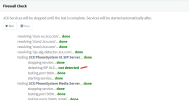
Firewall check runs fine. There is "not detected" on SIP ALG but I think that is ok. 1679327584944.png
 
Have you modified the codecs used for the app?

Does your 3CX have enough resources?

You may want to look at sticking 3CX in the cloud and seeing if this improves performance.
 
Remote site internet/WiFi issue?

Run pingplotter side by side at the remote site, one on hard-wire, one on WiFi. If results don't match and packet loss is visible on wifi connection, it points to remote WiFi.

If users are using cell data 3/4/5g ignore my suggestion :)
 
So in the past I had a PBX in the cloud and then the local agents had issues with calls. Granted that was some time ago and things have changed, but since the SIP trunk is local and most of the calls are local, I think it makes more sense to keep the PBX local than to have the majority of the calls go to the remote PBX and then back to the office.
I did spin up a remote 3cx instance though as I thought perhaps it might be better for the remote agents to connect to that instance and bridge the SIP trunk between the local and remote PBXs. however:

1. that seems to simply add overhead and complexity to the situation
2. It seems the trunk needs to EITHER go to the local PBX OR the remote one. I can't seem to figure out how to get users of the remove PBX to join the local site's Call Queue...

Interestingly, remote agents have told me they find that outgoing calls seem to work better than those coming in through the call queue.

I don't believe there are capacity issues on the 3cx server (Virtual Machine on a pretty capable Synology NAS), although I will check since the NAS does run quite a bit of video, so perhaps that is congesting the LAN throughput of the NAS... I'll try disabling the security cams temporarily next time there is a known issue to see if that makes a difference.

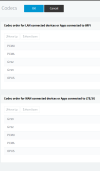
Regarding the codecs, I don't think I changed them, however, this is the current setting. Anything seem off?

1679331713118.png
 
Remote site internet/WiFi issue?

Run pingplotter side by side at the remote site, one on hard-wire, one on WiFi. If results don't match and packet loss is visible on wifi connection, it points to remote WiFi.

If users are using cell data 3/4/5g ignore my suggestion :)
I had done this in the past and did not notice anything significant on either end local lan.
What I did see was at times, latency was higher and those latency lags seemed to come from some of the routers in the middle of which I obviously have zero control. That is why I was wondering fi there were better direct "routes" to join.
We never have these issue when connecting with Google meet between the two offices for example, and that also includes video...
 
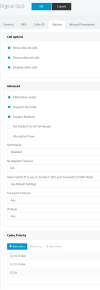
This is the setting on the local SIP trunk. Open to ideas on what to change if you think it can help.
1679332544615.png
 
Maybe make codec 729 in first order for everything since it has the least overhead?
 
G.711 U-law = PCMU
G.711 A-law = PCMA

Note the WAN devices are using 729. Ideally if the codec is constant then 3CX doesn't do real time transcoding. If bandwidth isn't a concern I'd try PCMU/711u, and experiment from there.

If you have physical phones also check their codecs.
 
You may want to look at sticking 3CX in the cloud and seeing if this improves performance.

I find that this, along with a local SBC, simplifies things rather than complicates them.

If you're running 3CX on a Synology NAS I would be concerned that it does not have sufficient resources available on a consistent basis. When you look at the minimum specs for 3CX they don't seem to sit within the performance envelope of a VM running on most Synology NAS devices - I'm struggling to think of one that offers the equivalent of an 8th Gen i5 with 2 dedicated vCPUs and 2Gb of RAM available for the VM.

I would also consider that if your NAS is handling video on the same network adaptor you could be saturating the (presumably Gigabit) link or other parts of the system (such as disk I/O).
 
Thanks for that. I'll have to do some research on the SBC, but can I install that as a VM on the NAS?
 
Thanks for that. I'll have to do some research on the SBC, but can I install that as a VM on the NAS?
Yes, it's the same ISO, but again, running VMs on a NAS isn't really ideal.

You'd want a real hypervisor or a physical machine.
 
  • Like
Reactions: Lee Cramman
Thanks for that. I'll have to do some research on the SBC, but can I install that as a VM on the NAS?
Sorry, my previous post should have said 8th gen i3 (rather than i5) for a small deployment.

You possibly could, it's less demanding than running a PBX (although I believe the recommended specs are exactly the same). However, if an underpowered VM is your issue you risk reproducing the problem elsewhere in the chain by doing this. An old PC (with SBC running bare metal) or a Raspberry Pi will often be better for these duties.

3CX have also recently introduced the concept of the "Router Phone" which is a phone that can also be your SBC. https://www.3cx.com/blog/docs/sbc-router-phone/
 
So a user just experienced issues. I checked system resources on the NAS and on the 3cx installation and nothing was strained. It's running 3 dedicated cores and 8 GB ram.
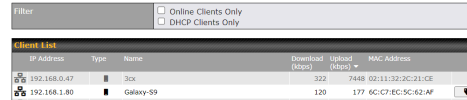
However, I did catch the 3cx device doing an upload during this time. This significant upload would explain the issue since the internet connection is capped at 10MB.1679668516329.png
I can't find what would cause this. Any ideas? Not a backup as that is set at night.
 
Unfortunately I can't view this. View attachment 34802

Hi Colin

Basically a recent post on the partners forum, where 20% of the users of a system are located in Philippines and they are having call quality issues, mainly the first few seconds of the call, then tends to settle down. A few comments about poor internet in Philippines.

We have a Manila client that has issues occasionally and its always pointed towards their network.
 
Status
Not open for further replies.

Forum statistics

Threads
111,974
Messages
590,081
Members
164,899
Latest member
mazet