- Joined
- Dec 1, 2021
- Messages
- 127
- Reaction score
- 21
I have this error message coming up in my Dashboard:
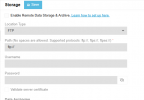
Remote storage is not configured. It is required to keep your system performant and easily updatable. Set Up Remote Storage
However, in the manual (https://www.3cx.com/docs/manual/backup/) is says:
To use the “Local disk” just disable Remote Data Storage & Archive and set the directory in Backup → Settings.- browse to select a local backup path with appropriate filesystem permissions.
But there is no area when I can set this!
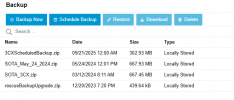
3CX seems to be handing the backups just fine, and storing it locally at 3CX.
Stuck in a loop!!
Help!
Remote storage is not configured. It is required to keep your system performant and easily updatable. Set Up Remote Storage
However, in the manual (https://www.3cx.com/docs/manual/backup/) is says:
To use the “Local disk” just disable Remote Data Storage & Archive and set the directory in Backup → Settings.- browse to select a local backup path with appropriate filesystem permissions.
But there is no area when I can set this!
3CX seems to be handing the backups just fine, and storing it locally at 3CX.
Stuck in a loop!!
Help!