- Joined
- Dec 4, 2024
- Messages
- 2
- Reaction score
- 1
Hello Guys,
I'm posting this question to you since I could not find any reference to it within the forum groups.
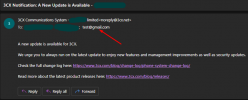
Therefore, how can I remove this email address (from "To" field) from every 3CX notification messages, please? I searched through all admin panel settings but could not find any link to "[email protected]".
Please see the attached screenshot.
Product: 3CX Enterprise (20.0) 32 SC, Type: Self Managed
Thank you in advance!
BR,
George
I'm posting this question to you since I could not find any reference to it within the forum groups.
Therefore, how can I remove this email address (from "To" field) from every 3CX notification messages, please? I searched through all admin panel settings but could not find any link to "[email protected]".
Please see the attached screenshot.
Product: 3CX Enterprise (20.0) 32 SC, Type: Self Managed
Thank you in advance!
BR,
George