Remove registration from RPS

Status
Not open for further replies.

toneco

Forum User
Basic Certified
Joined
Jul 3, 2018
Messages
4
Reaction score
0
Hello,

I have been testing with yealink and 3CX and now the phones are registered with Yealink RPS (same with Fanvil).

How can I remove them from the RPS?
 
Hello,

If you delete the phones (or switch to LAN/SBC and save) the RPS entries will automatically expire after two weeks.

Meanwhile, you can still provision them in other modes, just reset them and cancel the login prompt when it appears, before you configure them as PnP again.
 
I have a fanvil which I provisioned in a earlier test PBX. I never removed the phone from the 3CX. Just deleted the PBX. I am unable to provision the phone in any other PBX at this time, including a new 3CX. Is this something I can fix?
 
Which method you will use for the new PBX, STUN again like before?
 
We do Direct SIP - STUN Remote
 
Ok add the phone's MAC in the new PBX, and save the extension settings.

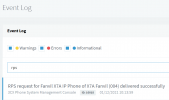
Then go to the 3CX "Event Log" and look at the messages. Does it say that the RPS was delivered successfully?
 
WE got it registered again and now removed the phone and will wait 2 weeks to see what will happen. Thx.
 
Ok so just to be clear (because I did not understand what you said above)

1. Did the new PBX show a message like this in the Event log?
1638349222899.png

2. Did you manage to get it to register on the new PBX, just like you wanted?

- If the answer is yes to both, then no waiting is required
- If the answer is no, then please tell me more about what happened
 
Status
Not open for further replies.

Members Online Now

Forum statistics

Threads
111,832
Messages
589,282
Members
164,662
Latest member
DejanMDS