Solved Replace X5U with X6U

Status
Not open for further replies.

sonnyh1

SOHO User
Joined
Jan 18, 2023
Messages
112
Reaction score
16
I just replaced an X5U with an X6U.
I went into the provision tab of the X5U and changed the MAC to the X6U, which worked as expected.
How can I change the phone type to X6U without loosing all the phone settings?
 
Hi, I wonder how is the phone provisioned?

You can not do that about only replacing the MAC because it will not work.

Add the X6U as new phone and delete the XV5. You will have the same extension, BLF, just need to set the rest of the settings such as display language, date format, time zone, etc. It takes less than a minute to do that.
 
All the settings and 3 pages of BLF went to the x6u when I changed the MAC.
of course the IP is different.
If I add as a new phone is there a way to copy all the BLF and menu settings?
 
Interestingly, I just looked at the phone setup in 3CX and it is now showing X6U-V2 instead of X5U
 
If I add as a new phone is there a way to copy all the BLF and menu settings?
You are using the same extension, the blf configured in the extension will be used to any phone provisioned with this extension.

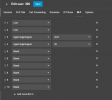
1697571895518.png
 
@sonnyh1 please make sure that you delete the phone from your extension, and add it again using the correct model.

Even though you were simply lucky and it happened to work (because those models are similar mostly) you are still at risk here.

When new firmware comes out, the system will offer your phone the X5U firmware file instead of the X6U because this is what you have selected. This could potentially break your phone, so do the right thing please and fix it.

And as my colleague Alejandro pointed out, the BLFs are stored on the extension. So you will not lose them by replacing the phone. Always make sure that you configure BLFs via 3CX otherwise there will be a risk of losing them.
 
  • Like
Reactions: Alejandro_3CX
How do I delete the phone without deleting the extention?
 
I am using the 3CX Dashboard
 
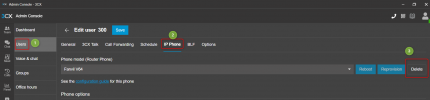
its the same procedure, from the pbx management console ---- edit the user --- go to the phone provisioning tap ---- click on delete
 
  • Like
Reactions: JohnS_3CX
thank you
 
  • Like
Reactions: Alejandro_3CX
Just deleted and reinstalled the phone via the admin console.
Everything seems to be working.

Thank you both for the help!
 
ok, glad to know it is working, have a great day!
 
Status
Not open for further replies.

Members Online Now

No members online now.

Forum statistics

Threads
111,834
Messages
589,287
Members
164,663
Latest member
svdDGS