- Joined
- Jun 3, 2021
- Messages
- 21
- Reaction score
- 2
Hi,
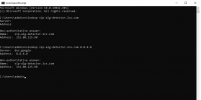
I use SonicWall TZ300 and have opened all ports as described in the user manual of 3cx. Still, I have issues resolving 'sip-alg-detector.3cx.com' & testing 3CX SIP Server failed, detecting SIP ALG... not reachable.
I had opened all the ports, Disabled SIP Transformations, port remap disbaled, Changed UDP timeout but still have the above issue.
I have attached the firewall checker result
I use SonicWall TZ300 and have opened all ports as described in the user manual of 3cx. Still, I have issues resolving 'sip-alg-detector.3cx.com' & testing 3CX SIP Server failed, detecting SIP ALG... not reachable.
I had opened all the ports, Disabled SIP Transformations, port remap disbaled, Changed UDP timeout but still have the above issue.
I have attached the firewall checker result