- Joined
- Mar 28, 2022
- Messages
- 3
- Reaction score
- 0
Hello,
because of the change in default settings we would like to use the REST API to create our video conferences.
This works fine except for one point.
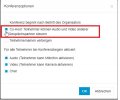
Participants are not able to share their screen/documents.
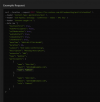
Below you can see the result for GET /scheduled/:meetingId.
selfModeration is set to true but it does not seem to have the desired outcome.
{
"status":"success",
"result":{
"meetingid":"202203290550046995c9cfbe6bb6c4cgg71e537fa1ec67",
"type":"webinar",
"openlink":"https://3cx.xxx:5001/meet/fa2f831807b111a350af59734ed4579d32db0877",
"pin":"46471682",
"dialIn":"0000000700",
"hostJoinFirst":false,
"selfModeration":true,
"hideParticipants":false,
"audioOnStart":true,
"videoOnStart":true,
"chatOnStart":true,
"datetime":"2022-03-29T06:39",
"duration":45,
"subject":"REST API Meeting",
"description":"Meeting created by the REST API",
"organizer":{
"name":"Oliver Fischer",
"email":"[email protected]",
"extension":"059"
},
"participants":[]
},
"errorInformation":""
}
Is there any other setting required for participants using the openlink to share their screen?
Thank you!
Best Regards
Oliver
because of the change in default settings we would like to use the REST API to create our video conferences.
This works fine except for one point.
Participants are not able to share their screen/documents.
Below you can see the result for GET /scheduled/:meetingId.
selfModeration is set to true but it does not seem to have the desired outcome.
{
"status":"success",
"result":{
"meetingid":"202203290550046995c9cfbe6bb6c4cgg71e537fa1ec67",
"type":"webinar",
"openlink":"https://3cx.xxx:5001/meet/fa2f831807b111a350af59734ed4579d32db0877",
"pin":"46471682",
"dialIn":"0000000700",
"hostJoinFirst":false,
"selfModeration":true,
"hideParticipants":false,
"audioOnStart":true,
"videoOnStart":true,
"chatOnStart":true,
"datetime":"2022-03-29T06:39",
"duration":45,
"subject":"REST API Meeting",
"description":"Meeting created by the REST API",
"organizer":{
"name":"Oliver Fischer",
"email":"[email protected]",
"extension":"059"
},
"participants":[]
},
"errorInformation":""
}
Is there any other setting required for participants using the openlink to share their screen?
Thank you!
Best Regards
Oliver