Restore 1 Click Dial for Click2Call Browser Extension

Status
Not open for further replies.

Keith Winhall_3CX

Product Communicator
Free User
Joined
Aug 3, 2021
Messages
60
Reaction score
67
Call out in one click when using the Click2Call browser extension. We have created a simple method to restore single click calling, to streamline the user experience.

Why the extra dialog?​

The Click2Call browser extension allows phone numbers on any webpage or CRM system to be ‘clickable’ sending the number to your Web Clie...
Continue reading the Original Blog Post.
 
Hi, thank you for your post.

I do not get the benfefit of the extension when already using the desktop app or its predecessor, which can handle tel, callto etc protocol in conjunction with the correctly configured protocol handlers. At least talking for windows OS.

I DO get the sense of the registry adjustment to get the dial process done with just one click.
But what exactly does the browser extension bring you on top of that?
 
You need the browser extension to do click to call for numbers on websites or apps that dont adhere to the tel protocol. There are still a few CRMs and quite a few websites that dont.

The just one click post is about the fact that the latest browser versions ask what you want to dial with and you can bypass this with this registry entry.

If you dont need to dial from numbers on websites you can skip installing the extension. Myself i make a search on google maps to get the correct number to call.
 
Last edited:
  • Like
Reactions: N_G
What can we do on macOS? The desktop client is not a workable option because audio doesn't work.
 
Actually I see in the blog post you have 3CX in the chrome click to dial pop-up how do you get this. I have installed the chrome extension on mac and the mac client and 3CX is not part of the list just Skype and Google phone. If I could get 3CX into the list this problem wouldn't be so bad it would be an extra Clark but not a complete showstopper.
 
What can we do on macOS? The desktop client is not a workable option because audio doesn't work.
Currently the softphone options for MacOS users are the WebClient or the new PWA App we introduced:
https://www.3cx.com/blog/releases/web-client-pwa/

Actually I see in the blog post you have 3CX in the chrome click to dial pop-up how do you get this. I have installed the chrome extension on mac and the mac client and 3CX is not part of the list just Skype and Google phone. If I could get 3CX into the list this problem wouldn't be so bad it would be an extra Clark but not a complete showstopper.
https://www.3cx.com/blog/releases/1-click-dial/
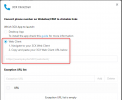
Download the Click2Call Chrome Extension from the link at the bottom, then configure it to make numbers 'clickable' and to be loaded into the WebClient:
1643187519110.png
 
Okay that seems to have worked really reasonably well I may have some fine tuning to do (would be nice just the dial pad opened and not a whole new window in a new tab) but we can definitely move forward like this. Great that this forum so well monitored.
 
  • Like
Reactions: NickD_3CX and N_G
Sorry to revive this old thread. On MacOS the "click to call" popup still shows up. On Windows we can disable it through the Registry Editor, but on Mac we could only use the experimental flag "chrome://flags/#click-to-call-ui", now removed. Do you have any suggestion?
 
Status
Not open for further replies.

Forum statistics

Threads
111,993
Messages
590,175
Members
164,931
Latest member
admintest