Solved Restore a "hosted by 3cx" pbx - outbound rules

Status
Not open for further replies.

phild-cxcxcx

Free User
Joined
Nov 1, 2022
Messages
17
Reaction score
4
I am relatively new to 3cx. I have a "hosted by 3cx" pbx running it 1st year trial,
and ran into a little problem...I contracted with Twilio for a Sip trunk. They helped me
set it up for both incoming and outbound call rules. Incoming works, and outbound ( 4 rules)
also worked..

About a week ago, I set all routes to "BLOCKED" for security reasons, until I could understand
how to structure the rules I wanted ( in this case, just local calls ).
But, I find I just don't understand how to do this - I managed to mess up the rules so that
now I cannot make any kind of outbound call, and didn't write down the original rules( of course!)

I thought perhaps by restoring a backup from 10/29/2022, I could get them back, but I've never done
anything on this level. and it also seems like overkill.

I guess I am asking either for guidance on writing outbound rules, or advice whether or not to try the restore.

I have read every article about making outbound rules ( including Nick Galea's ), and tried what was
suggested, but it did not work in my system.

Can anyone give me some help?

Thanks,
 
What do you current have as rules?
 
You could take a backup, restore the old backup, review the rules (note them down), re-restore the new backup you took in step 1 and then re-create them.

It's overkill, but doable.

You could also explain what you want to be able to do and we could mock up what the outbound rules should look like.
 
cannot make any kind of outbound call
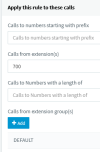
As a starting point, you need just one rule, with:
1667790933025.png
(note group DEFAULT) and set "Route 1" to your SIP trunk, not BLOCK CALLS. That's really it.

(calling from 700 allows conferences to call out)
 
As @SteveITS said, you need to start simple, test that it works and make them more advanced as you go along.

For start create 1 outbound rule with your extension in the "Calls from extension(s)" and your trunk in route 1. Try to make an outbound call. If that works you can them add extensions, prefixes and strip and prepend digits.

You will get more advanced as you go along and become more familiar with outbound rules
 
To All, So sorry about the long delay. I had expected an email notifying me of your replies, which
never came...

I have gotten some rules to work. Calls to either (US) npa+nxx+xxxx numbers ( 10 digits ) work,
and also calls to 1+ npa+nxx+xxxx ) 11 digits.

And, I think I understand the logic in these rules better, which is what I needed to do.

So, I don't need to restore a snapshot...
 
Now, I have run across a really puzzling problem...

Users are used to dialing "9" to dial an external call.

Here's my first (failed) attempt to emulate this in 3cx, for local calls:

In my city, we don't need to dial the area code with a local number...
just the 7 digit number.

I created a rule called "Local"
Calls to numbers prefixed with "9"
Calls with length 8 ( i.e. the 9 and 7 digits)
Route1 = my twilio SIP trunk.

The trunk will treat the call as a long distance number, so I
1. strip one digit ( the "9" )
2. prepend +1641 ( 641 being local area code )

If the user dials 97654321 (e.g. )

It should send out +16417654321

By the way, I know this will work, since I can dial 16417654321 and get through, using one of
the working domestic rules.
After raising the "local" rule to the top of the list ( for testing ),
I dialed 97654321 from a 3cx extension ( in this case the Android app
on my smartphone)

The call was rejected ( a voice said "cancelled" and hung up).
I checked the call log to see what actually was sent...it was 97654321 =
exactly what I dialed! The rule did nothing...this puzzles me a lot.

Have I missed something?


Phil
 
Does your rule have any other conditions?
Also 3CX does not have a voice saying cancelled to it must have gone to the provider.
The call log is not the best place to look as to what was actually went out to the provider. Check the activity log of the PBX to see that actual Invite to the provider. You will need to set the logging level to verbose though.
To do so, navigate to Dashboard / Activity Log / Settings and set the logging level to verbose.
Then make another call. Check the activity log for the Invite using the filter button. Just select the last call on the list and search for the Invite from the PBX to the provider and not the Invite sent from the phone to the PBX.
Alternatively you can run a packet capture and see the Invite there.
 
OK, Yiannis!

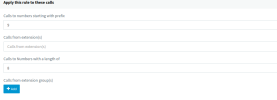
This morning I set the activity log to Verbose, and made another call using the "Local Calls" rule. I attached screenshots
of my rule settings. NO other conditions were made: prefix: 9, length 8, From any extension.
Route 1 is my Twilio trunk. Strip 1 ( the "9" ), prepend +1641 ( E.164 with 1 for USA, and 641 as the local area code
here. ).

I was surprised, maybe shocked, because it worked! I am fairly certain I changed nothing since last time
I called ( yesterday ) yet it worked...these sort of things really worry a programmer-type like me, since
they don't seem reliable or predictable...

I tried the call again, just to be sure. Worked. I looked in the Acitivty log and could not find a line
that showed INVITE from pbx to Twilio.

I did find the lines that showed which rule was matched, and how the number changed from this rule..
See the top 3 lines.

11/09/2022 6:25:54 AM - [Flow] Call(C:308): making call from L:308.1[Extn:1000] to T:Line:10000>>+16414724045@[Dev:sip:[email protected]:5060]
11/09/2022 6:25:54 AM - [CM503027]: Call(C:308): From: Extn:1000 ("Phil D'Agostino" <sip:[email protected]:0>) to T:Line:10000>>+16414724045@[Dev:sip:[email protected]:5060]
11/09/2022 6:25:54 AM - [CM503004]: Call(C:308): Route 1: from L:308.1[Extn:1000] to T:Line:10000>>+16414724045@[Dev:sip:[email protected]:5060]
11/09/2022 6:25:54 AM - Outbound CID reformat rule for DN:10000 is disabled (<Rules />)
11/09/2022 6:25:54 AM - Line limit check: Current # of calls for line Lc:10000(@twilioto3cx[<sip:[email protected]:5060/UDP>]) is 0; limit is 10
11/09/2022 6:25:54 AM - Call(C:308): Call from Extn:1000 to 94724045 matches outbound rule 'Local with 9 + 7digits'
11/09/2022 6:25:54 AM - [Flow] Call(C:308): has built target endpoint: Out#:>>Rule{Local with 9 + 7digits}>>94724045 for call from L:308.1[Extn:1000]
11/09/2022 6:25:54 AM - [Flow] Target endpoint for 94724045 is Out#:>>Rule{Local with 9 + 7digits}>>94724045
11/09/2022 6:25:54 AM - Selected prefix: 9
11/09/2022 6:25:54 AM - Looking for outbound rule: dialed = [94724045], processed: [94724045]; from-ext:
11/09/2022 6:25:54 AM - [Flow] Building target endpoint to 94724045 from "Phil D'Agostino" <sip:[email protected]:0>

BTW, the Call Log shows the right number as well ( +1641 +NXX+XXXX

If it continues to work predictably, then this is solved...

Your thoughts?

Phil
 

Attachments

  • Local-rule-11.9.png
    Local-rule-11.9.png
    18.1 KB · Views: 1
  • Local-rule-route1.png
    Local-rule-route1.png
    15 KB · Views: 1
The activity log will give you a lot of information and if the call went out there is going to be an Invite. Its above the lines that show what outbound rules is matched.
Trust me outbound rules are very predictable and reliable.

BTW, the Call Log shows the right number as well ( +1641 +NXX+XXXX
If the call goes out an its answered then the correct number will be shown in the call log (after the reformatting). If it fails then the call log will show the number dialled by the endpoint.
 
Yiannis,

Thank you. I tried another outbound rule ( 9+1+ 10 digit number ) and it worked perfectly.
And thanks for the info re: the call log entries. I am learning...

Phil
 
  • Like
Reactions: YiannisH_3CX
Status
Not open for further replies.

Forum statistics

Threads
111,974
Messages
590,081
Members
164,899
Latest member
mazet