Solved Restoring Recordings

Status
Not open for further replies.

SystemWise

Silver Partner
Advanced Certified
Joined
Dec 12, 2014
Messages
35
Reaction score
9
I am migrating a 3CX Version 16 inhouse instance to a 3CX Version 18 cloud instance. The PBX has a lot of call recordings that are included in the backup. I have configured a Version 18 3CX system in the cloud, using a trial key, and created additional disks to hold the recordings. So on the original system the recordings were stored "/var/lib/3cxpbx/Instance1/Data/Recordings", but on the new system they will be located "/mnt/recordings".

Question: How do I restore the PBX and the recordings to the cloud and ensure that the recordings land in the correct folder?

Regards,

Tony
 
Hi @SystemWise,

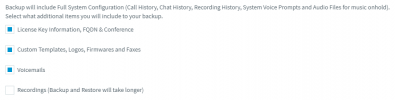
To start I'd say you'd need to take a backup on the old machine selecting everything except your recordings. Schedule this during downtime as it may take a bit. Save the backup off of the old machine. Power it down (don't delete it).

1638196521581.png

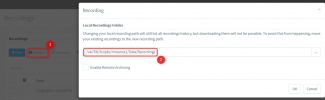
Now install the new machine using the backup. Power up the old machine and copy the Recordings. Place them where you want. Now point the Management Console to the recordings.

1638194456469.png

To test that it works, try and download a couple of them.
 
I take it the backup will not take the path from the live system and just overwrite the path with the original one?
 
Hi @SystemWise,

The backup will include the original location's path. Once you follow the steps laid out above, change the path to where you'd like the PBX to find the files and it will continue with that path in future backups.
 
Thank you for the feedback. I have done something similar in the past and it can take a really long time, I believe I also have to re-index all the calls afterwards if I do it this way.

The only reference to the location I can find in the zipped backup is in the xml file stored on the root of the zip file. If that is correct can I just download the backup, modify the "<recordingPath>" line, then restore from that backup?

<generalSettings>
<backupPath>#######/Testing/</backupPath>
<recordingPath>/mnt/recordings</recordingPath>
</generalSettings>

If so then theoretically all the recordings should be accessible immediately.
 
Hi @SystemWise,

No, I wouldn't suggest doing this. There's no reason to edit an exported file, running any risk of causing a problem instead of just using it as mentioned above.

If so then theoretically all the recordings should be accessible immediately.
Should you do this, it would be at your discretion.
 
  • Like
Reactions: Evolute IT
Hello Vasilis,

FYI: Changing the xml file does not work.

The only reason I ask is from a disaster recovery point of view. I have been asked to create an SOP for a scenario where our online host, OVH, has an extended outage and we need to restore all the systems to say AWS. All of our scheduled backups are full backups so I would have no way of doing what you suggest in that scenario. I can't take an extra backup without recordings from a dead system.

I am sure I could ask support if this scenario ever came to pass, but if it did I assume support would have their hands full.

Regards,
 
Hello Vasilis,

FYI: Changing the xml file does not work.

The only reason I ask is from a disaster recovery point of view. I have been asked to create an SOP for a scenario where our online host, OVH, has an extended outage and we need to restore all the systems to say AWS. All of our scheduled backups are full backups so I would have no way of doing what you suggest in that scenario. I can't take an extra backup without recordings from a dead system.

I am sure I could ask support if this scenario ever came to pass, but if it did I assume support would have their hands full.

Regards,
Archive the recordings on a Google Bucket and do the same with backups. This way, any system you spin up can be restored and use the same recording storage instead. You would then only lose maximum 1 day of calls (the archiving can be set daily, weekly or monthly, or manual.)
 
  • Like
Reactions: NickD_3CX
Hi Vasilis,

I have not tried it yet in the real world, only on my test. The client in question has 25GB of recordings so needs to be planned, as I said the recommended way is very time consuming.

Regards,
 
Hi @SystemWise,

Alright, I'll leave this thread open. If you require any assistance, feel free to let me know.
 
Hi ConceptWeb,

I think that I will go with your suggestion. The archiving seems the best option all round. I can keep my 3CX small, backups small, and disaster recovery will be quick.

One question, if I take a backup without recordings, restore, then attach the restored system to the Archive google bucket, will the recordings just appear or do I need to set the "RECS_SYNC_REQUIRED" to 1 and let it re-index?

Regards,

Tony
 
Hi ConceptWeb,

I think that I will go with your suggestion. The archiving seems the best option all round. I can keep my 3CX small, backups small, and disaster recovery will be quick.

One question, if I take a backup without recordings, restore, then attach the restored system to the Archive google bucket, will the recordings just appear or do I need to set the "RECS_SYNC_REQUIRED" to 1 and let it re-index?

Regards,

Tony
No need to reindex.
 
been looking around.. recordings are not being moved to google bucket on daily time.. suggestions on ways to rectify? had moved to FTP while back after update to v18, but seeing google bucket still a choice.. I switched back over and not seeing recordings archived to google bucket!
 
been looking around.. recordings are not being moved to google bucket on daily time
Are you saying that they do not archive at all now or only some of them are not being archived?

If they are not being archived at all can you provide the following info:

• Can you manually archive a local recording?
• Can you set the PBX's backup to use the same Google Bucket, do manual backups work?
• What happens if you go into "Recordings >> Location" and then Disconnect and then reconnect the bucket. Does it reconnect? Note: Make sure you have the .json file available to re-upload before you disconnect.
 
  • Like
Reactions: Mayur
Are you saying that they do not archive at all now or only some of them are not being archived?

If they are not being archived at all can you provide the following info:

• Can you manually archive a local recording?
• Can you set the PBX's backup to use the same Google Bucket, do manual backups work?
• What happens if you go into "Recordings >> Location" and then Disconnect and then reconnect the bucket. Does it reconnect? Note: Make sure you have the .json file available to re-upload before you disconnect.
Hi ChrisC_3CX
was able to archive to FTP no issue. have disconnect and reconnect to bucket and it seem to have worked..
thanks for your suggestion!:)
 
  • Like
Reactions: ChrisC_3CX
Excellent! Happy to hear everything's in order now!

Don't hesitate to start a new thread should you need anything else!
 
Status
Not open for further replies.

Forum statistics

Threads
111,974
Messages
590,081
Members
164,899
Latest member
mazet