Return to previous menu or component

Status
Not open for further replies.

akmag47

Joined
Feb 21, 2015
Messages
15
Reaction score
0
Seems like I'm not sure how to implement this with the VAD. I tried a loop component but that does not help me in this scenario.
I also tried to create another callflow within the same project and then implement a "Transfer" component to go to that callflow, but it's not showing the extension I set it with.

This is a sample logic I'm trying to implement:

Menu
|
User Input
/ \
Yes No
(Continue (Go back to menu)
to next
component)
 
This is how I would do that:
1) Create a custom component and put the User Input (Yes to continue / No to go back) into it. Set public variables to know the result from outside.
2) From the main callflow use a Loop component containing the Menu component inside. And loop while some condition keeps you looping. You need to set the condition to false when you need to exit the menu.

Transfering the call from one extension to another is not a good idea because the user will listen music on hold and ringback. The user experience is not flowing... Also, if you transfer the call, all the variables are lost because you're in a new call, so you can't share state between the 2 calls...

Regards.
 
Thanks, I implemented something similar to that. But I'm still getting some issues which is related to this question..

I have the the loop with the user input (without putting it inside the custom component) and menu inside it. The 2 components inside the loop are in that order. So basically:

In the user input:
I put in 11 digits, end with a # sign

Goes to the menu:
Asks for a digit, I press "1" (Loop checks if digit is not equal to "1")

The expected response would be exiting out of the loop after this.
However, it prompts the invalid digit prompt in the menu component and it prompts the initial prompt again.
Then it exits out of the loop. What could be causing this behavior?

I also read from some forums that the AllowBargeIn field should be set to False to avoid issues with the prompt playback (previously would not prompt the numbers I set in the user input).
 
That behavior (repeating the prompt) is pretty sure caused by another error. So let's look for the other error and that should be solved.

What condition are you using for the Loop component? You should define a callflow variable for it, and change the value of that variable in the menu branch. Is this how you're doing it? Can you share a screenshot of that part and the values of the conditions?

Thanks.
 
My callflow variable is ConfirmCaseNumState and it is initially set to "0". When it reaches the menu branch, according to what the digit is pressed on the menu, the expression "1" is stored in option 1 and expression "2" is stored in ConfirmCaseNumState.

Then the loop checks if ConfirmCaseNumState is NOT_EQUAL to "1".

Here's some screenshots:

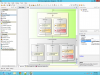
Option 1 where variable ConfirmCaseNumState == "1".


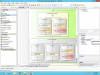
Option 1 where variable ConfirmCaseNumState == "2".


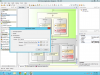
Loop condition where it checks if ConfirmCaseNumState != "1".


When I look at the 3CXIvrServer.log, this is what I get based on the call:

09:08:29.796|3732|VXIMachine.cpp(806):IvrDll, CallSession::RegisterPrompt(), Added prompt C:\ProgramData\3CX\Data\Http\Interface\ivr\TRC-IVR_Debug_170\TextToSpeech\TTS_0_2015_02_27_09_08_29_297.wav
09:08:30.747|3732|VXIMachine.cpp(1072):IvrDll, CallSession::Prompts_Play(), Play Queued files
09:08:51.399|3732|VXIMachine.cpp(1108):IvrDll, CallSession::Prompts_Stop(), Stop playback
09:08:51.502|3732|VXIMachine.cpp(806):IvrDll, CallSession::RegisterPrompt(), Added prompt C:\ProgramData\3CX\Data\Http\Interface\ivr\TRC-IVR_Debug_170\TextToSpeech\TTS_0_2015_02_27_09_08_51_451.wav
09:08:51.732|3732|VXIMachine.cpp(806):IvrDll, CallSession::RegisterPrompt(), Added prompt C:\ProgramData\3CX\Data\Http\Interface\ivr\TRC-IVR_Debug_170\TextToSpeech\TTS_0_2015_02_27_09_08_51_551.wav
09:08:51.885|3732|VXIMachine.cpp(1072):IvrDll, CallSession::Prompts_Play(), Play Queued files
09:09:05.969|3732|VXIMachine.cpp(1108):IvrDll, CallSession::Prompts_Stop(), Stop playback
09:09:12.291|3732|VXIMachine.cpp(806):IvrDll, CallSession::RegisterPrompt(), Added prompt C:\ProgramData\3CX\Data\Http\Interface\ivr\TRC-IVR_Debug_170\TextToSpeech\TTS_0_2015_02_27_09_09_12_217.wav
09:09:12.442|3732|VXIMachine.cpp(806):IvrDll, CallSession::RegisterPrompt(), Added prompt C:\ProgramData\3CX\Data\Http\Interface\ivr\TRC-IVR_Debug_170\TextToSpeech\TTS_0_2015_02_27_09_09_12_316.wav
09:09:12.538|3732|VXIMachine.cpp(1072):IvrDll, CallSession::Prompts_Play(), Play Queued files
09:09:24.602|3732|VXIMachine.cpp(1108):IvrDll, CallSession::Prompts_Stop(), Stop playback
09:09:24.602|3732|VXIMachine.cpp(806):IvrDll, CallSession::RegisterPrompt(), Added prompt C:\ProgramData\3CX\Data\Http\Interface\ivr\TRC-IVR_Debug_170\TextToSpeech\TTS_1_2015_02_27_09_09_12_396.wav
09:09:24.602|3732|VXIMachine.cpp(806):IvrDll, CallSession::RegisterPrompt(), Added prompt C:\ProgramData\3CX\Data\Http\Interface\ivr\TRC-IVR_Debug_170\TextToSpeech\TTS_0_2015_02_27_09_09_12_316.wav
09:09:24.639|3732|VXIMachine.cpp(1072):IvrDll, CallSession::Prompts_Play(), Play Queued files
09:09:34.843|3732|VXIMachine.cpp(1108):IvrDll, CallSession::Prompts_Stop(), Stop playback
09:09:35.011|3732|VXIMachine.cpp(806):IvrDll, CallSession::RegisterPrompt(), Added prompt C:\ProgramData\3CX\Data\Http\Interface\ivr\TRC-IVR_Debug_170\TextToSpeech\TTS_0_2015_02_27_09_09_34_962.wav
09:09:35.453|3732|VXIMachine.cpp(806):IvrDll, CallSession::RegisterPrompt(), Added prompt C:\ProgramData\3CX\Data\Http\Interface\ivr\TRC-IVR_Debug_170\TextToSpeech\TTS_0_2015_02_27_09_09_35_119.wav
09:09:35.726|3732|VXIMachine.cpp(1072):IvrDll, CallSession::Prompts_Play(), Play Queued files
 

Attachments

  • loop_view1.png
    loop_view1.png
    149.6 KB · Views: 7,306
  • loop_view2.png
    loop_view2.png
    148.5 KB · Views: 7,303
  • loop_view3.png
    loop_view3.png
    149.6 KB · Views: 7,296
When using numbers, you don't need to use quotes. Quotes are only used for strings. And note that you should use single quotes (') and not double quotes (").

Please try removing the quotes and let me know.
 
I took out the numbers from the quotes. Also, I revised all double quoted constants with single quotes. But, I am still getting that invalid prompt before exiting out of the loop.
 
I think I found out what was causing the error. It's probably because the stop digit was not being flushed out of the buffer as I set the Max Digits to 11 and Min Digits to 11 when i enter the case number on the Menu component.

I changed the MaxDigits to 12 and it was able to avoid the invalid digit prompts and go straight to the next component.
 
This is how it works:

If you set MinDigits = MaxDigits = 11, then the User Input component will expect exactly 11 digits. So, if the user enters 11 digits and then the StopDigit, the User Input will consider the input complete with after the 11th digit, and the StopDigit will not be considered, and therefore leaved for the next input or menu in the call flow.

If you want to let the user enter the Stop Digit, then you need to configure MinDigits < MaxDigits. For example, set MaxDigits to 12. But if the entry is always 11 digits, then there is no need for the Stop Digit. The Stop Digit is usually used when the entry length may vary, in order to confirm the entry so the user doesn't need to wait for the digit timeout to complete it. For example, if you can enter between 10 and 11, then it's good to have a Stop Digit, otherwise users entering 10 digits will need to wait for 3 seconds (or the configured value) for the timeout and then continue to the next component.

Kind regards.
 
Status
Not open for further replies.

Latest Posts

Forum statistics

Threads
112,322
Messages
591,882
Members
165,469
Latest member
footandankle.my3fcx.us