- Joined
- May 24, 2024
- Messages
- 12
- Reaction score
- 1
Hello,
I’m running 3CX PRO Version 20.0 Update 3, self-hosted on Digital Ocean with Multi-tenant mode enabled.
I am logged into the PBX using the "System Owner" account.
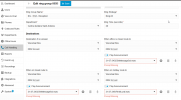
When editing a tenant's ring group, I encounter a "Prompt Missing" error (screenshot attached).
The prompts in question were created by a receptionist who has "Owner" rights within their department. I added myself to the department as well, but the issue persists. Interestingly, when logged in with the receptionist's account, the prompts are not missing.
Main Issue: When a client reaches the ring group, the prompt does not play, which is causing significant issues. I’m unsure where to begin troubleshooting this.
My intuition suggests it could be related to file permissions either within the VM or the PBX itself.
Any guidance would be greatly appreciated!
Thank you.
I’m running 3CX PRO Version 20.0 Update 3, self-hosted on Digital Ocean with Multi-tenant mode enabled.
I am logged into the PBX using the "System Owner" account.
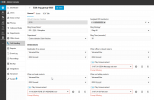
When editing a tenant's ring group, I encounter a "Prompt Missing" error (screenshot attached).
The prompts in question were created by a receptionist who has "Owner" rights within their department. I added myself to the department as well, but the issue persists. Interestingly, when logged in with the receptionist's account, the prompts are not missing.
Main Issue: When a client reaches the ring group, the prompt does not play, which is causing significant issues. I’m unsure where to begin troubleshooting this.
My intuition suggests it could be related to file permissions either within the VM or the PBX itself.
Any guidance would be greatly appreciated!
Thank you.