Ringback after parking call

Status
Not open for further replies.

nnell

Joined
Aug 21, 2012
Messages
7
Reaction score
0
Hi there,

I have been having some trouble configuring 3cx call parking ring back feature at one of our clients.

The user parks a call to deal with another hangs up on the second one but the original call is not returned from hold.
The problem I am experiencing is the ring back feature not performing its task

They were looking forward to the new feature in version 11 to allow automatic ring back after an allotted time.

Phones are Aastra 55i /53i
voip provider is voiptalk

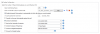
Call parking configuration page
11t0eb8.png

Anyone else tried to configure this feature yet?

Will post logs shortly
 
We use this all the time - on Shared Parks (SPx). Is this what you have configured ? Or are you trying to use this on *0x and *1x parking?
After this timeout, the original extension rings 5 times. Then the call is back on Park for another minute.
 
Hi Craig,

Currently its configured on sp9, I tested through 3cx assistant which is working ok but when doing transfers to the parking extension so you can pick up another call, the call never gets transferred back after hanging up.

Call Parking Configuration
http://imgur.com/7qBUv

Call log from the time of a transfer.
http://pastebin.com/kSYbwT3E
 
The callback feature is a function that was added in 3cx v11. You do not appear to be on v11 given your reference to the Call Assistant, which was replaced by MyPhone with the release of V10. Take a look at the blog for V11 features and download.
 
Hi lneblett

Force of habit, i meant myphone, current 3cx version is v11.0.26364.600.
 
Got it. No problem. As Craig is using and more familiar with it, I leave to him as I am guessing he has success and I have yet to try.
 
I can show you our settings and know that it works.
We are doing this thru BLF's on the phones and are not using Parking in MyPhone because of the restrictions of grouping (having to give the user too many rights).
I have tested it in MyPhone and it is working properly there as well.


Perhaps looking in the logs may be helpful.
This is what I see on the RingBack:
[CM503001]: Call(C:6235): Incoming call from ParkOrb:SP0 to <sip:[email protected]:5060>

I assume you have a valid license attached to your 3cx system?
 

Attachments

  • cp.png
    cp.png
    26.5 KB · Views: 1,297
Hi Craig, Thanks for the reply

Yes we have the same settings here (see the image in my previous post)
And yes their is a valid licence attached.

So your using the BLF's? are they triggering the feature codes in 3cx?
 
The BLF's on the Yealink are programmed as "Shared Park" SP1, etc.

It looks like you are not using Shared Parks - but are using Dial Code parks - *0x and *1x but reprogramemd to use *7 and something else?

I think the ringback is only in the Shared Parks.

But even then - if you Parked a call in MyPhone (Right Click and Park Call) then it should come back to you . However, you keep mentioning TRANSFER to I am guessing you are transferring to your *7x in MyPhone ?
 
Hi

You hit it on the head Craig,

Parking Orbits 0-9 are for regular run of the mill parking. Dial a code, Park a call, dial a code, pick it up.

SP0-SP9 are SHARED Parking intended for use with the 3CX Softphone, Cisco SPA Series Phones, and Yealink phones, to allow the SHARED PARK Feature.

Is their a way to setup a feature code to park or pick up from a shared park?
 
you can try a dummy extension that is set to away and away status forwards to spx.
so, ie ext 601 is SP1
but it is not full proof. i am not sure how the ringback works either using that method.
 
Morning Craig,

Thanks for the idea, will give it a try and report back this afternoon ;)
 
*update,

Ring back from sp0 to a dummy extension works great, which gets the transfer to working but not the pick up from.

Aside from buying decent phones, is their any way to pick up a call from a sp ?
 
Hi,

you can use myphone app to pick up the call from sp
 
How do you setup the forwarding on the dummy extension i am trying to make SPs to work with older/lower price phone that do not have BLFs, i came across the same suggestion on another forum but it is not very clear for me what number would i have to transfer the call in order to have it parked on the specific SP.

Any help would be greatly appreciated!

Sincerely

Alejandro Giraldo
RetailAid Business Solutions
9-20 35th Ave, Suite 3-O
Long Island City, NY 11106
ph: (718) 786 6870
fax: (718) 701 5889
http://www.RetailAid.com
[email protected]
 
It seems maybe this was a bug or something. It does not seem you can t ransfer a dummy extension to an SP anymore since SP1.
 
Ringback for parking call only works with SP, not transfer p

craigreilly said:
I think the ringback is only in the Shared Parks.

But even then - if you Parked a call in MyPhone (Right Click and Park Call) then it should come back to you . However, you keep mentioning TRANSFER to I am guessing you are transferring to your *7x in MyPhone ?

Craig is correct, and I believe this is a major feature blunder that the ringback feature only works with shared parks (SP0, etc) and not with standard parking ([trans] *0x for us).

Note that in the MyPhone settings under the "Preferences" tab, in the "Miscellaneous" section there are three parking options:

"Park to Shared Parking Places (SP)"
"Park always in this Parking Orbit"
"Increment Parking Orbit"

If you are using anything other than "Park to Shared Parking Places (SP)", ringback on timeout will not work for you. It has taken me since v11 came out (August to December) to figure this out.

Anyone see a feature request for this to be fixed?
 
I am really hopping to find the way to do the shared parking from phones with out BLF key. This would make for much more user friendly parking.

The dummy extension method as I understand it is as flows…

Create dummy ext something like 501 and set it to “Away” in the “Other Tab”

On the “Forwarding Tab” click “Away Tab” now what would be nice is if the “Send call to:” list would have the SPX extensions listed but that would be to easy!!

What I have seen is to set the “An external number or Skype ID” to SPX were x is the park spot you want. This does not seem to work in v11 I get error that says system extension can not be used as an external number.

If anyone can help I know everyone would be grateful!!!

Found it!! Read the post link. The trick is to put the SPX in the mobile number filed and in all forwarding tabs forward to mobile.
http://www.3cx.com/forums/grandstream-gxp2000-blf-issue-21100.html#p106234

by the way the this is a little off point but someone earlyer in this post was asking the dummy exts, and the SPX is the only way to go for parking (No one wants to *01/*11 & what if you need 5 parks, thats 10 buttons)
 
Great, i just tested it and it works like a charm, it is specially useful for handsets that dont have BLFs, you create as many dummy extensions as SPXs you would need, just make sure on each one of those you enter SPX as the mobile number, and make the extension forward to its mobile number all the time.

When parking you have to transfer the call to the dummy line associated to the SP that you want to use, and when unparking you just have to call the desired dummy extension, easy enough, much simpler than using *0x / *1x to park/unpark calls.
 
Good to know you found a workaround for these SP's.
 
Status
Not open for further replies.

Members Online Now

Forum statistics

Threads
111,843
Messages
589,326
Members
164,679
Latest member
SamadMYK