Solved Router Phone for Fanvil v62

Status
Not open for further replies.

surawoot

Titanium Partner
Advanced Certified
Joined
Sep 13, 2022
Messages
9
Reaction score
2
Dear team,

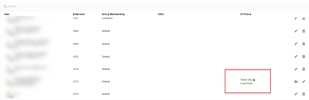
We have borrowed an IP-Phone Fanvil model v62 from our partner. We are confused about the feature router phone configuration on the 3CX PBX. Look at my attached image. Where is the menu router phone on the 3CX PBX? I think the 3CX guide is not clear.

1674457604266.png
 
Hello,

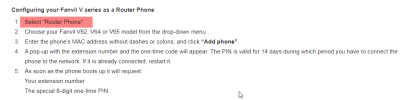
At the top of the guide, you will see a description:


1674458591122.png


This is basically accessible from the new web client admin in Update 6.
 
  • Like
Reactions: Evolute IT
Hi,

You need to delete the phone from the user.

Then add it back, but this time choose Router phone.

After you are done, you must factory reset the phone so it can switch to Router mode.

The phone should now ask you to enter your user and password on the screen.

Note: Make sure the firmware is updated to the version we provide, this is necessary to enable Router mode.
https://www.3cx.com/support/phone-firmwares/
 
I am having the same issue, I have 2 phones I am trying this on. A Fanvil X4U-V2 (Firmware 2.12.15.6) and a Fanvil V65 (Firmware 2.12.15.6), the system is 18.0 Update 6 (Build 908). When adding the phone there is no option to select router or local just a list of models. I have tried going through selecting the model and mac but then still there isnt an option for router phone.

Am I missing something as I thought this feature was added to the final release on update 6 the beginning of this month?

Thanks,

Tom
 
I am having the same issue, I have 2 phones I am trying this on. A Fanvil X4U-V2 (Firmware 2.12.15.6) and a Fanvil V65 (Firmware 2.12.15.6), the system is 18.0 Update 6 (Build 908). When adding the phone there is no option to select router or local just a list of models. I have tried going through selecting the model and mac but then still there isnt an option for router phone.

Am I missing something as I thought this feature was added to the final release on update 6 the beginning of this month?

Thanks,

Tom
Hi Tom,

Please make sure you upgraded your PBX to the latest version (Update 6), and then read our Fanvil guide.
https://www.3cx.com/sip-phones/ Don't skip anything, the entire thing has been rewritten for Update 6.
 
Hi Tom,

Please make sure you upgraded your PBX to the latest version (Update 6), and then read our Fanvil guide.
https://www.3cx.com/sip-phones/ Don't skip anything, the entire thing has been rewritten for Update 6.
Thanks, I have checked that the system is up to date and got the following "Your system is up to date. Last checked: Today, 10:18"

There are no update options available and when following the guides it simply says that it will give you an option for router phone or local phone which it doesnt. Do you have a screenshot of this screen so I can see what I am meant to be seeing?

Thanks,

Tom
 
Can you tell me your version number as it appears on the management console?
 
Ok perfect, and have you logged into the new webclient admin panel as per the new guides?
 
Took ages to work out, router phones can only be configured on the the new webclient admin panel.
 
  • Like
Reactions: AJDTech
Took ages to work out, router phones can only be configured on the the new webclient admin panel.
Thank you. I was looking for this all over for this as well!
 
You are welcome ;)
 
Status
Not open for further replies.

Members Online Now

Forum statistics

Threads
111,834
Messages
589,287
Members
164,663
Latest member
svdDGS