RTP before OK

Status
Not open for further replies.

ddstech

Customer
Joined
May 16, 2024
Messages
22
Reaction score
0
On prem 3CX v18.

We have a persisstant issue with inbound calls which presents as 1 way audio. We do not use IVR / Digital receptionist so all calls are directed to a group, all members of group are local extensions running 3CX client. In simple terms, caller rings, we answer and hear them but they can't hear us. 30 seconds later we've all hung up and they try again, usually with success. This probably effects 30% of inbound calls. Outbound calls are fine.

Majority of our inbound calls are from regular callers and it's obvious that some callers never have an issue and some are almost guranteed to fail first attempt. The callers with issues are a mix of mobile and landline users.

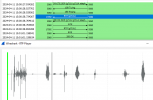
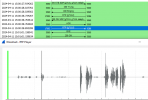
Pcap shows the same (interesting?) results for both failed and sucessful calls which has been confirmed with VoiceFlex SIP provider.
"PBX is sending early media without sending 183 first".

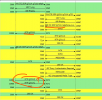
So flow from pbx goes something like this.. (Invite) - 100 Trying -> 180 ringing -> RTP-> 200 OK

It would seem that the above flow is accepted or handled by some inbound provers but not others.

Indeed call recording and captures show that audio is making it out of the PBX, just earlier than caller is expecting it.

I have toggled Earlier Media on and off, no difference and I've never seen a 183 in any pcap performed on inbound calls.
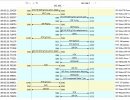
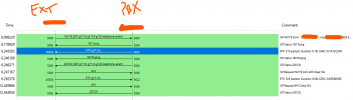
RTP before OK.JPG
 
Voiceflex = "Supported with Limitations".

And to be fair to Voiceflex they have run pcaps, pointed out the issue identified and ran through resetting up the trunks (there advice is to use a generic trunk rather than 3CX's Voiceflex SIP template) before pushing back as PBX issue.

I would fully accept a network issue as cause and follow through with any resolution, hence the packet captures provided, but where do 'we' start? To me it looks like the correct data is hitting the PBX from both sides but it's not getting processed in the correct order.

Would love to know what the limitations are with Voiceflex but I doubt it's intermittent one way audio.
To be honest would also love to know what the "supported" part means. Absoulutly no disprepect to those giving help and advice in the forums, seemed acceptable level of support when using for free. Surely on a paid product there should be some obligation by manufacturer to make sure it does what it is sold to do.

Some direction would be greatly appreciated.
 
Ignore the RTP before the 200 OK - I'm on VF and have the same flow.

1716902639625.png

So it happens intermittently?

Can you replicate it?

What is the OS of the server? AV?

Supported provider means it'll work right out the box with 3CX's templates.

Do you have mulitple WAN? or a load balancer? VLAN?

Have you turned on call recording and can hear both audio?

Have you checked the streams in wireshark and heard both audio?
 
  • Like
Reactions: bitn2
That's good news - I think but does then put a slight spin on next steps so let me answer the Q's..

So it happens intermittently?
Yes - but is very much dependent on the caller (originating network?). Given most of our callers are regular there is an obvious pattern
Some callers never have an issue.
Those callers who do have an issue almost never manage a sucessfull 1st call. (hang up try again and all ok)
The callers with issues are a mix of mobile users and different business land lines

Can you replicate it?
The issue is so freaquant that I can generally run a pcap for 60min at busy time and catch see it happen. Personally I can't replicate it but I'm sure I could ask one of our many clients experiencing this make a test call or two.

What is the OS of the server? AV?
Windows Server 2019
AV removed for testing so just runing built-in Windows Defender


Supported provider means it'll work right out the box with 3CX's templates.
OK, I did ask Voiceflex for a step by step guide to make sure I hadn't 2nd guessed anything but they just said use generic settings. Any chance of some eradicated screen shots of your working config tab by tab? :)

Do you have mulitple WAN? or a load balancer? VLAN?
We're running a pfsense firewall, no Vlan / loadbalancing in place for the PBX.
WAN connection is a 1000mbits leased line

Have you turned on call recording and can hear both audio?
Yes call recording on pbx turned on and can hear both streams.

Have you checked the streams in wireshark and heard both audio?
Yes, pcaps contain audio and even the captures Voiceflex capture from their side contained audio the caller never heard. That is the point Voiceflex said we are trasmitting audio too early / out of sequence

Further note. The server is on a HyperV (within a 2019 Host) with teamed NIC's. Initially the PBX was on a 2016 HyperV due to this is issue so has been migrated on to the 2019 host. Problem persisted despite the following the 3CX guidance on network config so one NIC has been removed from the team and dedicated to 3CX and configured with single-root virtualisation (SR-IOV). Happy to revert if needs be as made no difference!
 
I dont think your SIP configuration is the problem.

For clarification "...replicate it but I'm sure I could ask one of our many clients experiencing this make a test call or two." - Is the problem specific to one PBX or multiple?

3CX is getting the audio both ways so the problem is the audio leaving 3CX to the WAN.

Can you ask Voiceflex to start a trace, get the problem to occur again and compare your 3CX pcap with Voiceflex's pcap to see if the audio i reaching them?

Sorry, just read you already compared.

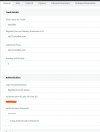
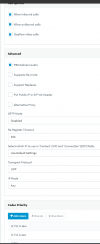
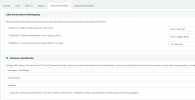
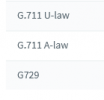
What is your codec order both in 3CX and in the voiceflex portal?

you've got a 415 unsupported media type in your flow which makes me suspect your codecs.

1716905911475.png

1716905940640.png

1716905955099.png

1716905966487.png
 
Last edited:
Is the problem specific to one PBX or multiple?
This our own 3CX PBX internally when recieving calls so a single PBX as far as I can tell.

Majority of our calls are from regualar inbound callers spread amongst ~ 100 different businesses.
Company A = Calls always OK
Company B = Calls always OK
Company C = 1st Call always 1 way audio, 2nd Call OK
Company D = Calls always OK
Company E = 1st Call always 1 way audio, 2nd Call Fails
Mobile A = Calls always OK
Mobile B = 1st Call always 1 way audio, 2nd Call Fails

For some I know there is a commonality between the provider they use, some clients have resorted to ringing us from their mobiles as ringing from business phone won't connect first time.

Other cleints have resorted to only rinigng us from a landline as there mobiles never work 1st time!

My initial reaction was to get the calling party to raise with their provider, but there are so many of them and mobiles are in the mix the common denominator seems to be us & with Voiceflex sat in the middle pointing at the PBX i don't really have any argument to put up.

I'll arrange for Voiceflex captures and see what I can catch, but if nothing has change since last case I opened with them then this is what I got back ...

"I can see audio on both ways.
Please troubleshoot your PBX to rectify the issue."


1716907171933.png
1716907125169.png
 
Those screenshots, are those from a call with no issue? I still think you should look at your codecs.
 
Yes, that is one call showing the RX and TX stream captured by Voiceflex. The first screenshot is actually me answering a call and then 20+ seconds of me saying hello.... hello whilst listening to the caller who makes lots of chatter but can't here me...
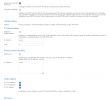
Codecs - what do you need to know? The capture above shows g711U in play in and out of VoiceFlex & Trunk is configured as below
1716907919936.png
 
What are your codecs in Voiceflex panel?

1716908827186.png

You said you had load balancing on the router, can you elaborate on this? Do you have more then 1 WAN IP?
 
1716909298768.png

G.729 disabled ?
 
No harm in turning it on, mine's on by default.
 
What are your endpoints? Custom templates? can you try setting up a new extension and use mobile app or web client and get your customer who cannot call in, to test?

I'm seeing in this invite that the SDP is establishing g711u but is sending as g711a?

1716910001300.png

How long has this 3CX been in place? When did you start using voiceflex? Did it work to begin with? Whats changed?

Turn off the load balancing for the sake of testing on the PFSense and check your 3CX has the same static WAN IP.
 
Last edited:
Endpoints are 3CXPhone for Windows v16.3.0.264 - I'm pretty sure have experienced this on the mobile app but happy to get some constants. Certainly happens on multiple extensions.

Just waiting on some confirmation so I can get captures scheudled for tomorrow AM then will arrange some tests.

3CX has been in place for apprx 4 years one way or other. hard to tell what's changed / not changed. Have been with VoiceFlex for much longer as used to feed into an on prem Avaya..

I get the feeling that as more and more of our clients are migrating to VoIP solutions then the issue appears to be getting worse, but has certainly existed in some form for many many months.
 
You need to get 3CX to go out and in on 1 WAN too.
 
I'm confident single WAN in use for the PBX in and out. One quirk is that the PC's the extensions are running on may well have a different route to the outside world, but they are on the same LAN as PBX so comms between 3CX App and PBX are consistant.
 
I'm confident single WAN in use for the PBX in and out. One quirk is that the PC's the extensions are running on may well have a different route to the outside world, but they are on the same LAN as PBX so comms between 3CX App and PBX are consistant.
To test that you can use a 3CX App on mobile data.
 
OK, so 2 days of as close monitoring as I can practically achieve.

Day 1 no issues, all looked promising so I presumed enabling G.729 at VoiceFlex end had done the trick.

Day 2 all was going well until 6hours in when we had a couple of 1 way audio issues within the space of a few minutes.

Admittedly with school holidays our call patterns are not as per a standard week but the Day2 afternoon failure is absolutely a good example of one of those callers that never has a successful first call.

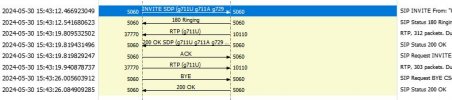
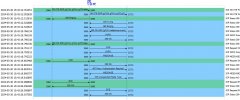
So VoiceFlex trace of failed call - I can confirm both RTP streams contain audio but caller could not hear us
VoiceFlextrace - failed call.JPG

Same call from 3CX capture... not RTP showing.
300524 154312- no audio.JPG
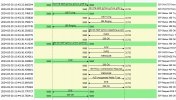
Caller rang back and call was successful..

Voiceflex trace - No RTP?

1717144243918.png
Same call from PBX capture - still no RTP showing -
300524 154332- success.JPG
Both above calls where answered by the same extension using the Windows 3CX app. No traces running today but already had first failure and answered by different extension.

VoiceFlex response to yesterdays request for traces...

"We have checked and all the calls seem to be pretty normal except for the call at 15:43, where the RTP stream from the PBX is not supposed to come until the 200 OK is sent from us. That would be an issue if the codec is different for both sides. But for this one codec was the same and shouldn't be an issue as well.

I believe this is an issue where the PBX does not recognize the RTP Stream sent from us. "


Hope this helps progress the issue further.
 
Just curious, whats your parameter set to if you search for ENABLEEARLYMEDIA?
 
ENABLEEARLYMEDIA = 0

I had toggled this both ways in previous months and it didn't make a difference.

Also back from VoiceFlex today is the below - unsure as to the change they are requesting knowing I've already toggled the above parameter but willing to listen and learn...

"If the PBX does not want to send RTP after the SDP (200 OK), we advise you to change the signaling from (200 OK) to (183 Session in Progress), which will align signaling to the correct standards. This is also known as early media."
 
Change it to 1 as thats the default value. Restart SIP service and try another trace.
 
Parameter changed and service cycled.

Do I need a failed call to see the difference or should changes be noticable on any call captured?
& do I need a VociceFlex trace or just a local 3CX one at this stage?
 
Status
Not open for further replies.

Latest Posts

Forum statistics

Threads
111,952
Messages
589,888
Members
164,843
Latest member
sambannoura