


- Joined
- Mar 18, 2021
- Messages
- 3
- Reaction score
- 1
Hello,
I have deployed 3CX from Google Cloud Marketplace, it included a default set of firewall rules, please see screenshot:
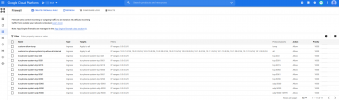
Furthermore I added two more custom rules:
- for icmp from everywhere
- for every protokoll from subnets of on prem VPN-Sites
As mentioned our on prem network is connected via Site-to-Site VPN to Google Cloud VPC.
Furthermore I am trying to provision against the internal ip adress in order to be able to hot desk.
The issues I'm having with this are:
- calls from internal to internal do not work (ip phone is ringing but when i accept, caller still gets dial tone and receivers mobile phone continues ringing)
- calls from internal to external do not work at all (no dial tone at caller, no call at receivers end)
- calls from external to internal work fine
However when I provision the ip phone against the external ip everything works fine.
So it seems to be an issue with the RTP ports 9000-10999 not beeing routed through the Site-to-Site-VPN.
I thought why not run a portscanner
against external ip:
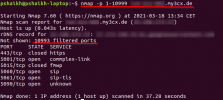
and against internal ip:
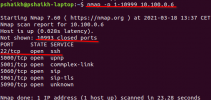
Please notice here that port 22 is open when scanning the internal adress due to the firewall rule
custom-tcx-phone-system-tcp-allow-all-internal
and the fact that I'm currently in the network of our on prem Site.
My question is why am I not able to use the ip phone when provisioning against the internal IP even when the firewall rule
tcx-phone-system-udp-9000
exists.
I have deployed 3CX from Google Cloud Marketplace, it included a default set of firewall rules, please see screenshot:
Furthermore I added two more custom rules:
- for icmp from everywhere
- for every protokoll from subnets of on prem VPN-Sites
As mentioned our on prem network is connected via Site-to-Site VPN to Google Cloud VPC.
Furthermore I am trying to provision against the internal ip adress in order to be able to hot desk.
The issues I'm having with this are:
- calls from internal to internal do not work (ip phone is ringing but when i accept, caller still gets dial tone and receivers mobile phone continues ringing)
- calls from internal to external do not work at all (no dial tone at caller, no call at receivers end)
- calls from external to internal work fine
However when I provision the ip phone against the external ip everything works fine.
So it seems to be an issue with the RTP ports 9000-10999 not beeing routed through the Site-to-Site-VPN.
I thought why not run a portscanner
against external ip:
and against internal ip:
Please notice here that port 22 is open when scanning the internal adress due to the firewall rule
custom-tcx-phone-system-tcp-allow-all-internal
and the fact that I'm currently in the network of our on prem Site.
My question is why am I not able to use the ip phone when provisioning against the internal IP even when the firewall rule
tcx-phone-system-udp-9000
exists.


