- Joined
- Dec 12, 2008
- Messages
- 2,939
- Reaction score
- 1,167
Hi, all
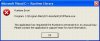
I'm interested to know if somebody, excepting DeWild1, which reported this issue, encountered on 3CXPhone.exe the error message box shown below.
If yes, I will ask you to provide some details, useful to locate and fix this issue:
- 3CXPhone version, as shown in its About menu
- if Plantronics were used (and Plantronics model)
- which action - or actions sequence - seems to trigger the error message box.
At this moment, it seems to be related with integrated Plantronics support, but we aren't able to reproduce it on our environment, that's why I'm asking you.
Thanks for help
vali
I'm interested to know if somebody, excepting DeWild1, which reported this issue, encountered on 3CXPhone.exe the error message box shown below.
If yes, I will ask you to provide some details, useful to locate and fix this issue:
- 3CXPhone version, as shown in its About menu
- if Plantronics were used (and Plantronics model)
- which action - or actions sequence - seems to trigger the error message box.
At this moment, it seems to be related with integrated Plantronics support, but we aren't able to reproduce it on our environment, that's why I'm asking you.
Thanks for help
vali