SalesForce integration: extra slow sync contacts between SF and 3CX.

Status
Not open for further replies.

a.ancarani

Platinum Partner
Advanced Certified
Joined
Apr 7, 2022
Messages
3
Reaction score
1
I kindly need support for a client of us that is starting to use 3CX Enterprise and he ended up to 3CX because of the CRM integration with Salesforce.
He reports some problem with the sync of contacts as checked when setting up the CRM integration and it seems to last way too long (days and it never ends!!)
I've read a thread on the forum about syncing 1000 contacts at a time, but I really what to know a trick to have this task ended.
Client reports to have kind of 120000 contacts to sync and we would like to make him happy!
any help, trick and suggestion is welcome.
 
Regarding the issue mentioned, I would like to inform you that when you integrate a CRM with 3cx, contacts are not all synced to the 3cx phonebook. It is only when a call is received or made that a CRM page will open to create a contact if the contact is not already in the CRM and once created and if you have the option to 'Add CRM contacts to 3CX Company Phonebook' (new to SP4) checked then this will also create a contact in the 3cx company phonebook. This is also mentioned here: https://www.3cx.com/docs/salesforce-crm-integration/
 
  • Like
Reactions: Evolute IT
Hi there!
i would like to report the same problem in my configuration.

I am journaling 3CX calls inbound and outbound to my Salesforce environment.
BUT, for some newly created Contacts, the calls are not registered at all!
I can call a client using "Click2Call", or the webApp dialer, or the DesktopApp dialer, doesn't matter, for those contacts the call is not created as a task in SF!
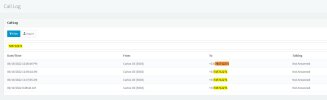
I can see the call in the admin console in the call log, but nothing appears in SF.

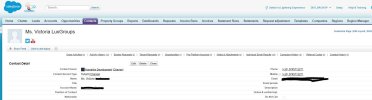
AND those contacts are not reflected in the 3CX phonebook as CRM contacts, there is no connection between both systems, despite of how many inbound or outbound calls they had.

I have tried a couple of phone formats (prefix, with or without zeroes).

What could be happening? How can i get those calls sync. ?

BR
Carlos G.
 

Attachments

  • error contacts 1.JPG
    error contacts 1.JPG
    100.1 KB · Views: 4
  • error contacts 2.JPG
    error contacts 2.JPG
    18.3 KB · Views: 4
  • error contacts 3.JPG
    error contacts 3.JPG
    57.6 KB · Views: 4
  • error contacts 4.JPG
    error contacts 4.JPG
    73.5 KB · Views: 4
Regarding the issue mentioned from @Carlos GM , what is the contact match strategy in the PBX? Is it set to match exactly?
 
Try to check if you have other contacts with that phone number.
If there are duplicates in your contacts the integration will fail in journaling the calls.
Also you have to check that CARLOS GILL (5003) have the same email on 3CX and SalesForce

In order to debug this problem enable Verbose logging in 3CX.
After that you can check the 3CXservicelog to see what's going on...

Best Regards
Andrea Ancarani
 
  • Like
Reactions: MarcelloL_3CX
Regarding the issue mentioned from @Carlos GM , what is the contact match strategy in the PBX? Is it set to match exactly?
Hi there!

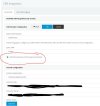
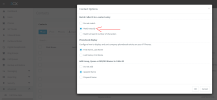
In theory the criteria is matching at least 7 characters.
I have changed it to 6, but the error persist.
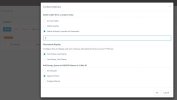
See the picture attached:

Any ideas?
 

Attachments

  • error contacts 5 matching criteria.JPG
    error contacts 5 matching criteria.JPG
    55.7 KB · Views: 1
Hi there!

In theory the criteria is matching at least 7 characters.
I have changed it to 6, but the error persist.
See the picture attached:

Any ideas?
You need to set the matching strategy to full match.
 
  • Like
Reactions: edossantos
  • Like
Reactions: edossantos
  • Like
Reactions: TheodorosG_3CX
Hi again.
the last update i did, where I adopted the "Exact Match" criteria worked pretty good.
Every number is detected and logged into SF.

BUT I have detected a bug:
For the very FIRST call, to a brand new CONTACT, never contacted before. That first call is not logged into SF.
The subsequent ones are properly logged, but not the first one.
It feels like the system requires some time to connect 3CX to Salesforce or so?

Any ideas about how to solve this specific situation?
BR
 
Hello Carlos,

All calls should be logged, even the first. We will need to see the logs in order to understand what's going on. Please proceed as follows:
1) Enable verbose logs from the 3CX Console > Dashboard > Activity Log > Settings.
2) Reproduce the issue.
3) Generate the Support Information package as described here.
4) Upload the generated ZIP file to the cloud, and send me a download link in a Private Message. Please include the details of the call you made (approximate date & time, number, Salesforce contact name, etc.).

Thank you.
 
BUT I have detected a bug:
For the very FIRST call, to a brand new CONTACT, never contacted before. That first call is not logged into SF.
The subsequent ones are properly logged, but not the first one.
It feels like the system requires some time to connect 3CX to Salesforce or so?
For your reference, I just verified this in our testing environment, and the first call for a newly created Salesforce contact is properly logged, both inbound and outbound. So we need to check your installation logs to help you troubleshooting this.
 
For your reference, I just verified this in our testing environment, and the first call for a newly created Salesforce contact is properly logged, both inbound and outbound. So we need to check your installation logs to help you troubleshooting this.
Thx for the feedback.
I have performed many tests with new contacts and in the 99% of cases the results are good.
But from time to time, my agents write me with one of these weird cases where the call is not logged (and part of their bonuses is based on calls so it is important for them).
I am performing tests and capturing the data right now. I managed to find one of those "stranger things".
I am preparing the info and will send it to you ASAP.
BR
 
Last edited:
Stupid question, how can i send u a private message?
 
Thx for the feedback.
I have performed many tests with new contacts and in the 99% of cases the results are good.
But from time to time, my agents write me with one of this weird cases where the call is not logged (and part of their bonuses is based on calls so it is important for them).
I am performing tests and capturing the data right now. I managed to find one of those "stranger things".
I am preparing the info and will send it to you ASAP.
BR
There is a known case in which calls are not logged, and that is when the SIP Trunk immediately rejects an outbound call. This is a known issue. But for established calls, this should not happen. Let's check the logs you have....
 
  • Like
Reactions: Evolute IT
Status
Not open for further replies.

Members Online Now

Forum statistics

Threads
111,843
Messages
589,328
Members
164,679
Latest member
SamadMYK