Solved SBC down in 3CX server after upgrade from v16 to v18.0.234

Status
Not open for further replies.

Daniel Belciug

Customer
Joined
Nov 20, 2021
Messages
22
Reaction score
2
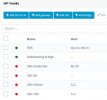
I just upgraded the 3CX server running on W10 from v16.x to v18.0.234. Now I have the next problem: all my SBC connections are down. In one location, I uninstalled the old SBC v16 and installed the new SBC v18, but no success.
I suspect that the tunnel do not bring up.
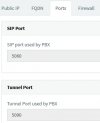
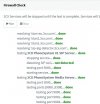
All services are runing fine. The firewall check is ok, including port 5090. I use ports 5060 for SIP and 5090 for tunnel. Any idea, please?
 

Attachments

  • firewal ok.jpg
    firewal ok.jpg
    49.7 KB · Views: 8
  • ports.jpg
    ports.jpg
    16.5 KB · Views: 8
  • SBC down.jpg
    SBC down.jpg
    33.8 KB · Views: 7
Did you change your https port?
 
No, I did not change it. I can access the interface of 3CX server over internet using the same address as mentioned in the provisioning URL in SBC: https://xxxxxxxx.3cx.ro:5001
I tested the visibility of open ports in server from internet and 5001 and 5060 are seen from internet, bot not the port 5090.
 
Is 5090 TCP /UDP open?
 
Yes. Ports 5000, 5001, 5060, 5061 and 5090 are opened in Windos Firewall. Using canyouseeme.org I can see ports 5000, 5001, 5060 and 5061 but not port 5090.
 

Attachments

  • FW-01.jpg
    FW-01.jpg
    61.4 KB · Views: 9
  • FW-02.jpg
    FW-02.jpg
    51.3 KB · Views: 9

Attachments

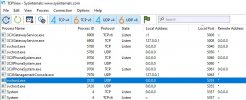
  • TCP View.jpg
    TCP View.jpg
    93.5 KB · Views: 6
Why do speak about windows firewall? is there any router firewall in your location? or does it means your windows pbx is directly exposed to internet ?

did you take care about your NIC if set on Private or public network?
 
Have you rebooted the 3cx ?

Are all the 3cx services running, ?

Are you running antivirus software on the machine, if so exclude

C:\Program Files\3CX Phone System\*
C:\ProgramData\3CX\*
 
Why do speak about windows firewall? is there any router firewall in your location? or does it means your windows pbx is directly exposed to internet ?

did you take care about your NIC if set on Private or public network?
Before upgrade, the firewall in the site was configures and the PBX was working fine, connecting the SBCs. Nothing changed in the site's firewall during or after the upgrade. Even so, I did check the configuration again and is ok.
I did check the LAN connection in the NIC card and is set to private network.
 
Have you rebooted the 3cx ?

Are all the 3cx services running, ?

Are you running antivirus software on the machine, if so exclude

C:\Program Files\3CX Phone System\*
C:\ProgramData\3CX\*
Yes, I did reboot the 3CX system 2-3 times, with the same result.
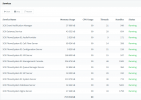
All services are running.
I have Bitdefender Antivirus installed, but not Total Security or other version that controll the internet traffic. I will uninstall the antivirus and I will reply again.
 

Attachments

  • Services.png
    Services.png
    31.4 KB · Views: 5
Now I uninstalled Bitdefender Antivirus, I restarted the server, I disabled the windows firewall for domain, public and private connection, and the test result is the same.
I made a test with the external port TCP 5090 forwarding it to internal port TCP 5060 on 3CX server and this way it is visible in internet.
I think that is not a wrong port forward or a windos firewall misconfiguration, but rather a service that listen on port 5090 on 3CX server is not working well. Unfortunatelly I do not know how to debug this situation and your help is very appreciated. Thank you!
 
As you have uninstalled the av,

Remove 3cx software
Reboot the server
Install 3cx
 
Last edited:
Yes, I have to try this solution next days.
In the mean time, I am wondering if 3CX PBX have a service for tunnel on port 5090 that can be restarted individually?
 
Yes, in v18 it's 3CX PhoneSystem Media Server.
 
I cannot find 3CX PhoneSystem Media Server in the list of services (see the last image posted).
 
Try looking in your blacklisted IPs.
 
There is no IP blaklisted.
 

Attachments

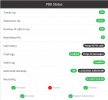
  • PBX status.jpg
    PBX status.jpg
    45.3 KB · Views: 6
I cannot find 3CX PhoneSystem Media Server in the list of services (see the last image posted).
I am afraid you'll have to reinstall from scratch and restore your backup. Media Server service is a crucial part of the PBX.
Is 3CX PhoneSystem Media Server present in the OS' Services list?
 
Last edited:
If it is there, try starting it manually. If not, we can try to register Media Server service from command line and see if it helps. If not, reinstall will be needed.
 
I am afraid you'll have to reinstall from scratch and restore your backup. Media Server service is a crucial part of the PBX.
Is 3CX PhoneSystem Media Server present in the OS' Services list?
3CX PhoneSystem Media Server present in not the OS' Services list. I just checked.
I will reinstall the PBX.
Thank you for your advices. After reinstall, I will post again.
 
Status
Not open for further replies.

Forum statistics

Threads
111,991
Messages
590,167
Members
164,929
Latest member
Cloudstar