SBC on Pi 4

Status
Not open for further replies.

AWS2P

Silver Partner
Basic Certified
Joined
Jan 9, 2014
Messages
5,076
Reaction score
1,096
Hi today I' ve tried an SBC install on PI 4
SBC install Doc, is not up to date always screen copy from pi3B

I Have followed link provided in trunk section in console ,https://www.3cx.fr/docs/tunnel-3cx-session-border-controller/ redirected to this one https://www.3cx.fr/docs/manuel/installer-ipbx-raspberry-pi/

My main problem is like in past, keyb stay qwerty and as a french i'd like Azerty, in 2019 StefanW said it was a bug in 3CX install, is it always the same ?

Everything I tried alone from raspberry sites didn't made any change, so as I'm not a linux guru , could you please help me to get it in French azerty.

Is there also a new up to date doc for SBC install?

Thanks for those who have no brain effort to do this to give me a hand ;)
 
I just set one up yesterday, and changed from the default en_GB to en_US. In raspi-config, Localisation Options should let you change the language and keyboard. I did get some errors when I deselected en_GB and chose "en_US.UTF-8 UTF-8", saying it couldn't load the keyboard (I don't recall what it was...something about not being able to load a few files). I went back in and added en_GB, chose "en_US.UTF-8 UTF-8" again, and this time it let me change the keyboard without an error. As to whether that gets you your desired keyboard, I didn't try French options, sorry.
I also pick a time zone in Localisation. Otherwise I just used the English version of that page, https://www.3cx.com/docs/installing-pbx-raspberry-pi/ which I don't think has changed at least that I noticed.
 
Thanks Steve,
I finally found yesterday night, your doc is the same I followed in French, but at step 3 never got this as it seem to be from Pi3B or Debian 9
So for Pi4B Debian 10 this is not the same screens.

Do you know if there's is an easy way to prepare an SBC using DHCP for a location without knowing what will be the IP range?
For now if I want to setup SBC and phones on my LAN connected to a Cloud pbx and after send to customer but how to connect SBC on their Lan? Customer is more than a thousand km from me.
 
Yes not this screen on step 3, nor ens32 but eth0 for network
 
Yes not this screen on step 3
What do you see when you execute the command: sudo raspi-config


nor ens32 but eth0 for network
Yes of course, if on your installation the interface name is different, you should maintain the name you have, not change it (in your case eth0). This is an example.
 
easy way to prepare an SBC using DHCP
3CX v18 is supposed to have auto-configuration capabilities.

I was able to follow the setup guide just fine. The Canakit kit comes with v10, I just checked.

The "step 3" screen image appears after step 3.3 when you run "sudo raspi-config." They could probably move the image down under 3.3.
 
  • Like
Reactions: NickD_3CX
I Had bought several Pi 4 before that offer already setup exist.
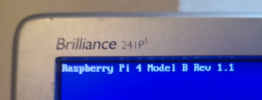
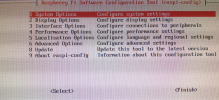
I get this
1610642035899.png
Sudo raspi-config result
1610642099346.png
 
Interesting, the one we have is "Raspberry Pi 4 Model B Rev 1.4" and does not have "4. Performance Options," only 8 choices on that screen. Still, what happens if you select "5. Localisation Options"? That should allow you to select languages and keyboard. I see 13 fr_* options including "fr_FR.UTF-8 UTF-8."
 
  • Like
Reactions: AWS2P
@SteveITS
I have a feeling that the new image of Pi OS may have a different menu structure so @aws2p seems to be right, I was curious and downloaded a brand new image today to confirm.

I will try and get the instructions updated so that not to have confusion.
 
  • Like
Reactions: AWS2P
I got french keyb , I'm not so confident on how I did but that's done , SBC is working connected pbx ;) :D
 
  • Like
Reactions: NickD_3CX
Status
Not open for further replies.

Forum statistics

Threads
111,988
Messages
590,157
Members
164,923
Latest member
2B_JPS