SBC Update: Raspberry Pi OS & Latest TLS Suite

  • Thread starter Thread starter Constantinos Constantinou
  • Start date Start date
Status
Not open for further replies.
But it works with raspberry pi 3? Then I will try to open up all for the SBC during an update and we will see if it works.
Yes, you can go ahead and it should update and come back online in less than a minute
 
  • Like
Reactions: PhilK
Yes, you can go ahead and it should update and come back online in less than a minute
Good security, but my mistake either. It worked. I should have watched at the firewall first. But I was thinking in the release notes was something written about raspberry pi 4 only. Sorry.
 
  • Like
Reactions: accentlogic
Good security, but my mistake either. It worked. I should have watched at the firewall first. But I was thinking in the release notes was something written about raspberry pi 4 only. Sorry.
Glad to hear PhilK!
 
  • Like
Reactions: PhilK
I checked all sides. Azure, local sbc network, port configuration. Just to make sure. There was no change. Ports are working.

During trouble shooting I did the following:
- restarted Azure machine of 3cx phone system
- performed the 3cx integrated firewall check (successfully)
- restarted local router
- tested port availability for sbc successfully
- resetted the phones on sbc site
- deleted and the rejoined the phones on SBC site to 3cx phone system again.
- changed SBC from TLS to TCP (@SteveITS ) , pushed config, restarted the sbc
- changed SBC hardware with spare RaspBerry.
- added a new windows driven SBC to phone system for testing purpose and used it instead of RaspBerry SBC

No steps from above has helped solving the issue. I'm out of ideas especially because this issue just started after updating to latest sbc version.

Again: If I change a single phone in network to use STUN direct conneciton it works perfectly without issues.

Any help is highly appreciated,working phones are urgently needed.
I have experienced issues of audio cutouts during calls since the update. The issue is only for phones behind the sbc, stun phones and apps work fine. Yealink t48s phones, rasp pi 4 sbc, lightsail pbx host. Did you figure out a fix? I went down a similar troubleshooting path as you to no avail. Glad to see I'm not alone because all testing points to the update as being the culprit.
 
I attempted to deploy this update on Friday and believe it was successful (the 'SIP Trunks' page on the PBX shows "Version: 16.2.24" against our SBC in the "Main Trunk No" column and the "[Update]" tag has disappeared). However, if I connect to the SBC virtual machine and run "lsb_release -a" it tells me the SBC is still running Debian 9.9 (stretch). As a result the cyber security auditors (who want everything to be running the latest security patches) are giving me grief.

The blog post above states that "The main focus of this release is the optimization of the SBC for Debian 10 and the addition of the latest TLS suite." However the release notes here (https://www.3cx.com/blog/change-log/3cx-session-border-controller-build-history/) only refer to the TLS suite upgrade and make no mention of Debian 10. Should my session border controller be running Debian 10 after the update to version: 16.2.24 (in which case the update hasn't been as successful as I thought) and, if not, can I safely run apt-get update as described here (https://www.3cx.com/blog/voip-howto/os-security-updates-debian) and here (https://www.debian.org/doc/manuals/debian-faq/uptodate.en.html) to get my SBC onto Debian 10?
 
I attempted to deploy this update on Friday and believe it was successful (the 'SIP Trunks' page on the PBX shows "Version: 16.2.24" against our SBC in the "Main Trunk No" column and the "[Update]" tag has disappeared). However, if I connect to the SBC virtual machine and run "lsb_release -a" it tells me the SBC is still running Debian 9.9 (stretch). As a result the cyber security auditors (who want everything to be running the latest security patches) are giving me grief.

The blog post above states that "The main focus of this release is the optimization of the SBC for Debian 10 and the addition of the latest TLS suite." However the release notes here (https://www.3cx.com/blog/change-log/3cx-session-border-controller-build-history/) only refer to the TLS suite upgrade and make no mention of Debian 10. Should my session border controller be running Debian 10 after the update to version: 16.2.24 (in which case the update hasn't been as successful as I thought) and, if not, can I safely run apt-get update as described here (https://www.3cx.com/blog/voip-howto/os-security-updates-debian) and here (https://www.debian.org/doc/manuals/debian-faq/uptodate.en.html) to get my SBC onto Debian 10?
As you're posting in this thread, I assume your SBC software is installed on a Raspberry Pi.
The upgrade option from within the 3CX Management Console does not upgrade the Linux OS of the SBC, only the software version.
The SBC software though is compatible with Deb10.

By the time you already have the RPi hardware, all you need to do is redeploy it from the beginning with these instructions:
https://www.3cx.com/docs/installing-pbx-raspberry-pi/#h.jwe6hv6da6l

Tip: In Step #4, set the same IP address as you had before, so that you don't have to reprovision your IP Phones.
 
As you're posting in this thread, I assume your SBC software is installed on a Raspberry Pi.
The upgrade option from within the 3CX Management Console does not upgrade the Linux OS of the SBC, only the software version.
The SBC software though is compatible with Deb10.

By the time you already have the RPi hardware, all you need to do is redeploy it from the beginning with these instructions:
https://www.3cx.com/docs/installing-pbx-raspberry-pi/#h.jwe6hv6da6l

Tip: In Step #4, set the same IP address as you had before, so that you don't have to reprovision your IP Phones.
Sorry, I should have been clearer. Our SBC isn't a Raspberry Pi. It is a virtual machine (running on a Windows 10 rack PC under HyperV) which I'm pretty sure I installed using the 3CX Debian ISO (also your link discusses setting up the PBX - I'm only considering the SBC at the moment).

But, from what you're saying, it sounds like you don't recommend what I suggested above and that we would need to reformat the virtual hard drive and install the OS afresh from a new ISO? If so, the ISO available here (https://www.3cx.com/docs/3cx-tunnel-session-border-controller) still appears to be based on Debian 9, so we have to wait?

P.S. Please excuse the slightly different forum name, I had tried to link my old forum name to the customer account but it still wouldn't let me post yesterday so I had to use the customer account.
 
Sorry, I should have been clearer. Our SBC isn't a Raspberry Pi. It is a virtual machine (running on a Windows 10 rack PC under HyperV) which I'm pretty sure I installed using the 3CX Debian ISO (also your link discusses setting up the PBX - I'm only considering the SBC at the moment).

But, from what you're saying, it sounds like you don't recommend what I suggested above and that we would need to reformat the virtual hard drive and install the OS afresh from a new ISO? If so, the ISO available here (https://www.3cx.com/docs/3cx-tunnel-session-border-controller) still appears to be based on Debian 9, so we have to wait?

P.S. Please excuse the slightly different forum name, I had tried to link my old forum name to the customer account but it still wouldn't let me post yesterday so I had to use the customer account.
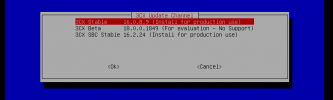
You are right, the ISO we link to from the SBC guide currently is still the Debian 9 ISO, but you can go the the V18 Beta blog post and grab the Debian 10 ISO that is for testing 3CX V18 PBX. Once you run it though, in the menu that is presented to you, you will have the option of installing the stable version of the 3CX SBC.
1626945355886.png

So yes, you will have to scrap the old VM and recreate one, but if you do so using the V18 ISO linked above, you will end up with the SBC on the Debian 10, using the 3CX ISO.
 
Status
Not open for further replies.

Forum statistics

Threads
111,991
Messages
590,167
Members
164,929
Latest member
Cloudstar