- Joined
- Jun 16, 2016
- Messages
- 22
- Reaction score
- 0
We have configured a Yealink T53 as an SBC in our office. This devcie seems to be working OK.
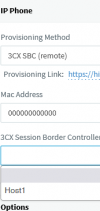
However, when we are then provisioning other phones (Yealink T21 E2 and T23G), they are detected OK via the SBC and appear in the 3CX Management Console in the Phones list as New Phones, but when we then try to assign an extension to them and Provisioning Method “3CX SBC (remote)” is selected, the SBC phone does not appear in the “3CX Session Border Controller” list and so cannot be selected. We can only get the phone working by selecting “Direct SIP (STUN – remote)” as the Provisioning Method.
Somehow, it has worked for only one phone (a T23G) so far, even though all the phones are on the same LAN and subnet (IPs obtained via DHCP)
Thanks
However, when we are then provisioning other phones (Yealink T21 E2 and T23G), they are detected OK via the SBC and appear in the 3CX Management Console in the Phones list as New Phones, but when we then try to assign an extension to them and Provisioning Method “3CX SBC (remote)” is selected, the SBC phone does not appear in the “3CX Session Border Controller” list and so cannot be selected. We can only get the phone working by selecting “Direct SIP (STUN – remote)” as the Provisioning Method.
Somehow, it has worked for only one phone (a T23G) so far, even though all the phones are on the same LAN and subnet (IPs obtained via DHCP)
Thanks