Scheduled Reports

Status
Not open for further replies.

lightingsupply

Premier Customer
Joined
Jul 6, 2022
Messages
6
Reaction score
0
We updated to Version 20.0 Update 2 (Build 715 Release) and were using scheduled reports with v18.

When I go to a user that was receiving reports and look under My reports there are none listed.

Is there a method to find the old reports and update them for v20.

Thanks

Greg
 
Unfortunately reports are not migrated, they must be recreated. By the extension receiving them.
 
Something was migrated as the user is getting emails that were setup in the old v18.
The user in v20 there are no reports under their extension but they still are getting emails.
 
Do you think if I recreate the user the report setting would also be removed?
 
That was the info I had written down from training. I don't think we've upgraded a PBX that had existing scheduled reports yet, so can't check directly, sorry.
 
Thanks for the info.
 
Unfortunately reports are not migrated, they must be recreated. By the extension receiving them.

In v18, it was frequent to have reports sent to multiple email addresses. Much more difficult setup in v20. And losing all the scheduled reports during the upgrade is a big pain...
 
Sorry for not being clear after reviewing my initial post.

We have a user that is receiving scheduled report emails that were configured in v18 even though we are running v20.
When I go to that users report section and view My reports there is nothing there.

I creating new reports thinking maybe if I deleted them it would delete the old report settings.

Would deleting and recreate the user remove the old reports.

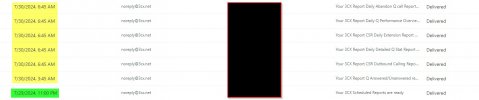
The highlighted yellow are v18 reports and the green is v20 which I believe
combines all reports into one email.
2024-07-30_3cx.jpg
 
Status
Not open for further replies.

Members Online Now

Forum statistics

Threads
111,835
Messages
589,288
Members
164,665
Latest member
dominik.pepel