Scheduled video conference link available before conference starts

Status
Not open for further replies.

fgc92210

Customer
Advanced Certified
Joined
Oct 28, 2020
Messages
185
Reaction score
29
greetings,

I scheduled 3 video conferences with different partners or ours in a future date.
Because I don't have the list of all engineers meeting with us, I click in the link available in the info (mine) so I can start the conf.
From there, I copy the link with the button dedicated for this, and I finally go in my calendar to create an invite with this link.
I do it this way because invitees can forward the invite to their coworkers.

I noticed though that if I use the link I sent them, they have direct access to the conf bridge days before it is supposed to start.
Is this normal?
 
Yes, this is normal once a meeting has been scheduled you can then enter it earlier or later if you wish.
 
Similar question. If I create a recurring invitation - once a week at a given time - it seems that the link sent out becomes invalid after 2-3 successful meetings. Is this because a participant ENDs the meeting rather than Leaves or is it that the meeting data is removed by a reboot?
 
Hi @double6jg

Have you tried scheduling one that is far in the future (ie. December 31st)?

This mustn't be deleted from your Webclient, and it will remain valid.
 
The one that has brought this to light is a recurring meeting commencing 20/01/2021 but with no end date. I haven't knowingly removed it from the web client.

It was used successfully on 20/1 and 27/1 and an ad hoc instance on 22/1.

Our 3CX hosted PBX was auto restarted over last weekend.

I'll do some further testing with an end date.
 
There is no end date, only a start date and duration in minutes. But a week after the start date it will expire.

So it makes sense you could use it from 20/1 to 27/01. Just create one far into the future and I think you should be ok in this case.
 
Thanks for that.
Just to be clear are you saying create a meeting with a start date of say 31/12 and use it every week before that date? i.e. in 3CX schedule the "start date" is actually the end date +7 days
I shall try it but shouldn't that info be more clear inside the web client for when you schedule such a meeting.
In todays world weekly meetings must be a regular occurrence. As far as I can see the recurrence aspect is only dealt with outside 3CX i.e. in O365 calendar
 
@JohnS_3CX

John, I understand as the meeting "creator" I could eventually go in, but is it normal that invitees can also get in weeks before it is schedule to start?

I would have assumed it would work the same as a voice-only bridge, where you can't get in until it starts..

Thanks!
 
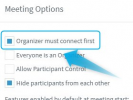
you can enable the feature "organizer to connect first" to avoid attendees to join without you
 
The option is grayed
 
  • Like
Reactions: Evolute IT
Hey @fgc92210

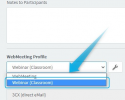
You should be able to toggle the option on or off if you first select "Webinar(classroom)" when creating the Webmeeting:
1612511327570.png

Meeting Options for "Webinar(Classroom)":
1612511348069.png
 
Hi @ChrisC_3CX
I saw that after since we barely use the webinar.
Once we are done this week with our meetings, I'll make sure to tell everyone to use Webinars and then to tweak.
 
  • Like
Reactions: ChrisC_3CX
Status
Not open for further replies.

Forum statistics

Threads
111,973
Messages
590,078
Members
164,896
Latest member
sameage