


- Joined
- Jun 17, 2019
- Messages
- 66
- Reaction score
- 5
Hi,
we've been hit by the same issue as described here: https://www.3cx.com/community/threads/webmeeting-invitations-are-different.78411/
People are complaining that the scheduled web meetings fail to create calendar entries.
If I chose Calendar type "iCal" and open the downloaded ics file, I can send the invitation via my mail client:
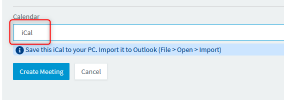
Therefore I'd like to update the documentation to do it that way, but I also like to completely disable the drop down menu and set iCal as default option. If I don't do this I know it will end in f*ck*d up invitation mails because users do not read the docs.
Is it possible?
Thanks!
we've been hit by the same issue as described here: https://www.3cx.com/community/threads/webmeeting-invitations-are-different.78411/
People are complaining that the scheduled web meetings fail to create calendar entries.
If I chose Calendar type "iCal" and open the downloaded ics file, I can send the invitation via my mail client:
Therefore I'd like to update the documentation to do it that way, but I also like to completely disable the drop down menu and set iCal as default option. If I don't do this I know it will end in f*ck*d up invitation mails because users do not read the docs.
Is it possible?
Thanks!


