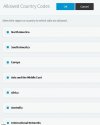
Security Allowed Country all enabled after New Update...

Status
Not open for further replies.

Enigma

Free User
Basic Certified
Joined
Apr 12, 2020
Messages
6
Reaction score
0
has anyone came across the allowed country in security all enabled by default after the new update. i have tried unticking the countries but it again gets enabled.. is there a bug in this new update.. please share your experience. i have tried in few 3cx pbx of different companies but after update all are same..
 

Attachments

  • 3cxCapture.JPG
    3cxCapture.JPG
    32.3 KB · Views: 9
Last edited:
I can confirm that when I did the update, this did not occur for me either.
 
  • Like
Reactions: VasilisV_3CX
@VasilisV_3CX @kieferschild It dint happen for all but for some and New Installation by default all allowed countries are enabled, but when i deselect any country or zone and click OK it doesnt get deselected.

  • 3CX Version, Enterprise Annual 18.0.234
  • Server OS, Debian 10
  • Is the 3CX Server Hosted and where? On-premises
 
Hi @Enigma,

What browser are you using to access the management console? What version is it? Are you using the same browser on the same PC to access both an instance that doesn't have this problem and one that does?
 
@VasilisV_3CX i am using Chrome and for all the instances for all customers others have no issue in same chrome applocation.
 
Hi @Enigma,

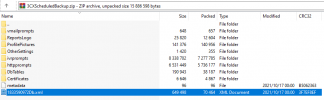
Do you have a backup to open and check the xml file? Search for "NOTALLOWED_COUNTRYCODES" and see if there is anything in the <Value>?
 
HI @VasilisV_3CX
I have checked the XML file but cant find NOTALLOWED_COUNTRYCODES in that..but i have checked with outher compant 3cx backup in that its there.. in that 3cx Mconsole i am not facing issue.. even that was updated to latest version.is there anything where i can manually disallow country codes..
 
Hi @Enigma,

You should see it in backup zip file you can download from the Backup and Restore.

Untitled2.png

Opening that file, you should see the the NOTALLOWED_COUNTRYCODES:

Untitled.png

Failing that, I'm going to suggest that you reinstall that specific PBX.
 
Dear @VasilisV_3CX
i have figured out temperory issue.. i have changed the values in Settings / Parameters/ NotAllowedCountryCodes that solved the issue,
but still when we go through security allowed country codes and tick or untick any country it goes back to ALL Enabled mode. then again have to make changes in parameters. it seems Security Allowed country code page is not making changes.
reinstall is not possible as its happening for most of customers after the latest update.
 
Hi @Enigma,

Does the PBX machine have any 3rd party software running on it?
 
@VasilisV_3CX
NO there are no third party application running. Its just the Debain 10 with 3CX on Rasberry PI.
 
Alright, thanks for the info.

I suggest contacting a 3CX Partner to further troubleshoot this issue.
 
Status
Not open for further replies.

Forum statistics

Threads
111,975
Messages
590,085
Members
164,904
Latest member
gdstratton