Solved "Select Network Card Interface" only shows private IP

Status
Not open for further replies.

Connexium Partner

Silver Partner
Basic Certified
Joined
Mar 4, 2020
Messages
115
Reaction score
57
Hello,

We have an instance installed via the PBX Express to Google Cloud (a little while ago) and in the "Network Settings" -> "Select Network Card Interface", I can only choose the private ip of the PBX
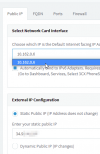
1613058553080.png

On Google Cloud, the Network interface details seems to be correct:

1613058664977.png

How could I correct this?

Thank you for your kind assistance

 

Attachments

  • 1613058621385.png
    1613058621385.png
    12.9 KB · Views: 6
Hi @Connexium Partner,

Changing the IP isn't facilitated by 3CX, instead you'll need to check if this is possible on the hosting provider side. You'd need to change the IP on the VM itself. Is there a reason that you'd like to do this?
 
@VasilisV_3CX

Hello!

I'm only asking this on the 3CX forum because the VM was entirely created by the 3CX PBX Express auto-install on Google Cloud.

The reason I am asking this is; would having the wrong IP (private one) here have adverse impacts on the daily operation of the PBX? Like the default IP in the SDP Signaling? Or elsewhere?
1613129140733.png

We currently have 2 VM on Google Cloud, both installed via the PBX Express and both have the same issue. Another VM with another provider (not PBX Express) is showing the correct IP. and 2 hosted by 3cx instances where I cannot see the option (disabled).

Thank for any pointers and recommendations
 
Hi Connexium,

What you see there is not considered a wrong IP, and you can safely leave it as is.

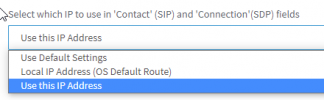
The PBX is aware of both its local and its public IP, and is smart enough to know when to use each one.

1. For local phones and gateways it uses the private IP. This does not apply to you of course because the PBX is in the cloud.

2. For remote phones and SIP Trunks that work over the internet, it will use its public IP. This is what applies to you in this case
1613132791882.png

So as you can see there is absolutely no need to make any changes here, the PBX has been designed to know what IP to use and if you were to try changing anything unnecessarily then that's when issues would be likely to occur.
 
  • Like
Reactions: Connexium Partner
Well, that was a very clear explanation of how the PBX behaves and uses this field!

I can now cross this possibility off my list of potential issues for an ongoing intermittent one way audio for inbound calls we are suffering. At this time, we are fairly certain it's on the trunk provider's side, since the both outbound and inbound IPs are correct in the SDP signaling and are awaiting the result of their investigation.

Thank you again for your kind assistance.
 
Glad to help!
 
Status
Not open for further replies.

Forum statistics

Threads
111,974
Messages
590,081
Members
164,899
Latest member
mazet