Self hosted 3CX, call reports with Play button

Status
Not open for further replies.

yankee80

Forum User
Joined
Mar 17, 2022
Messages
11
Reaction score
2
Dear all,

our users say that in the past, they were able to listen to call recordings in the Call Reports.

When I generate a report now (using my admin account) the Play column is always blank.

We are using self hosted 18.0 (Build 461) with a professional licenses.

Do we need to reconfigure the report somehow to include a Play button?
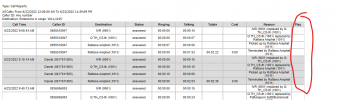


1655890228448.png
 
Dear all,

our users say that in the past, they were able to listen to call recordings in the Call Reports.

When I generate a report now (using my admin account) the Play column is always blank.

We are using self hosted 18.0 (Build 461) with a professional licenses.

Do we need to reconfigure the report somehow to include a Play button?


View attachment 30692
You need to enable call recording for both the users and the queues to get the play icon.
 
  • Like
Reactions: VoIPTools
Thanks for your prompt reply.

Sorry if I wasn't clear in my original post.

The recording function works well and calls to and from extension 1015 are recorded. however, there's no option to play those recordings in the Call report

1655952461604.png
 
I've narrowed it down to the fact that recording itself isn't working.

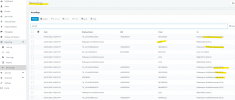
when I click the Select directory button in the admin console->reporting->recording settings, I get a 404 error

1658225131436.png
 
Have you given your PBX a reboot?
 
thanks Kiefer, yes several times. I'll try a few more
 
Status
Not open for further replies.

Forum statistics

Threads
111,974
Messages
590,083
Members
164,900
Latest member
Silent_Guru