- Joined
- May 12, 2022
- Messages
- 8
- Reaction score
- 0
I have a problem that has been the source of many grey hairs over the last week.
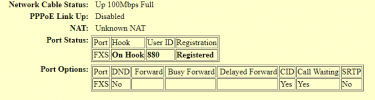
My dedicated fax number is provided via my SIP provider and routed through a Grandstream HT801 to an Office Jet 9010. Incoming FAX calls on the FAX line are directed to extension 880 (attached to the HT801) and the Office Jet picks them up. No problem there.
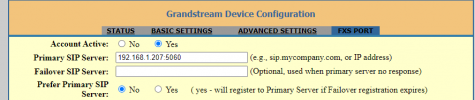
Outgoing FAX calls however can be seen attaching to the HT801 (the phone indicator light flashes showing the line in use) and the FAX dialer recognizes the dial tone and dials. Almost immediately, a double speed busy signal is heard. If I connect the Office jet to my home phone line (a VOIP line using a CISCO ATA box not going through 3CX, but with the same SIP provider) it works fine. Clearly there is something in the 3CX connection stack that is the problem
Now, I did have some weird things happen about a month ago in which my UPS fully drained (over 4 hrs with no power - and the auto shutdown failed...so all my systems hard crashed. Some of my VMs didn't enjoy that, including 3CX... I had to restore a 3CX configuration backup, and not everything came back right, so I may have a broken config somewhere. But I can't see it.
Around the same time, my internet connection was "upgraded" and my ability to port forward was lost. The 3CX firewall is quite unhappy with me, however voice calls with 3CX are working both incoming and outgoing.
I'm going to stretch and say its something in my configuration of the HT801
- The HT801 is brand new (replaced an HT802 that was questionable).
- The network port the HT801 is using is not the same as the HT802.
- The HT801 (as well as the HT802) are using a static IP. 3CX recognizes them by their MAC addresses.
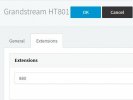
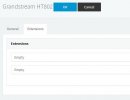
- The FAX/DECT server page has both the HT801 and HT802 on it, but the 802 has no attached extensions. The HT801 only lists extension 880 (the Office jet port)
- The FAX server is configured with ext 888 (though I dont use it - is this a default? is there a way to unconfigure this?)
- Incoming faxes on my incoming FAX SIP DID are sent to ext 880 The OfficeJet recognizes the incoming call and picks up just fine (I dont have a second fax machine to test with)
- When I look at the extensions list, 880 is saying its not registered (!! How is anything being sent to it then? !!) 888 is showing as registered (Should it be? Is it conflicting with 880?)
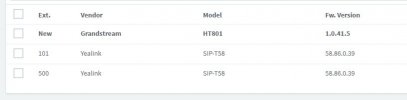
- The Phones page lists the Grandstream HT801, but it doesn't really let me edit anything. Its not showing in red, like an old firmware warning does, but it does show in bold. It still lists the ext as "New" (880 is only showing as an extension on the FAX/DECT page HT801 configuration)
- This is not simply a FAX problem as attaching a standard telephone in place of the Officejet results in the same.
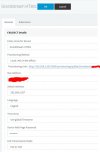
I have followed the directions on https://www.3cx.com/docs/manual/fax-server/ as closely as possible - The line called Fax Extension Authentication ID on the doc indicates to use the extension 888 again, but my 3CX version demands a secure password(??)
Despite 4 or 5 days of fiddling with this, and replacing hardware which might have been questionable at best...I cant seem to get outgoing FAXes to function
Any help would be appreciated
My dedicated fax number is provided via my SIP provider and routed through a Grandstream HT801 to an Office Jet 9010. Incoming FAX calls on the FAX line are directed to extension 880 (attached to the HT801) and the Office Jet picks them up. No problem there.
Outgoing FAX calls however can be seen attaching to the HT801 (the phone indicator light flashes showing the line in use) and the FAX dialer recognizes the dial tone and dials. Almost immediately, a double speed busy signal is heard. If I connect the Office jet to my home phone line (a VOIP line using a CISCO ATA box not going through 3CX, but with the same SIP provider) it works fine. Clearly there is something in the 3CX connection stack that is the problem
Now, I did have some weird things happen about a month ago in which my UPS fully drained (over 4 hrs with no power - and the auto shutdown failed...so all my systems hard crashed. Some of my VMs didn't enjoy that, including 3CX... I had to restore a 3CX configuration backup, and not everything came back right, so I may have a broken config somewhere. But I can't see it.
Around the same time, my internet connection was "upgraded" and my ability to port forward was lost. The 3CX firewall is quite unhappy with me, however voice calls with 3CX are working both incoming and outgoing.
I'm going to stretch and say its something in my configuration of the HT801
- The HT801 is brand new (replaced an HT802 that was questionable).
- The network port the HT801 is using is not the same as the HT802.
- The HT801 (as well as the HT802) are using a static IP. 3CX recognizes them by their MAC addresses.
- The FAX/DECT server page has both the HT801 and HT802 on it, but the 802 has no attached extensions. The HT801 only lists extension 880 (the Office jet port)
- The FAX server is configured with ext 888 (though I dont use it - is this a default? is there a way to unconfigure this?)
- Incoming faxes on my incoming FAX SIP DID are sent to ext 880 The OfficeJet recognizes the incoming call and picks up just fine (I dont have a second fax machine to test with)
- When I look at the extensions list, 880 is saying its not registered (!! How is anything being sent to it then? !!) 888 is showing as registered (Should it be? Is it conflicting with 880?)
- The Phones page lists the Grandstream HT801, but it doesn't really let me edit anything. Its not showing in red, like an old firmware warning does, but it does show in bold. It still lists the ext as "New" (880 is only showing as an extension on the FAX/DECT page HT801 configuration)
- This is not simply a FAX problem as attaching a standard telephone in place of the Officejet results in the same.
I have followed the directions on https://www.3cx.com/docs/manual/fax-server/ as closely as possible - The line called Fax Extension Authentication ID on the doc indicates to use the extension 888 again, but my 3CX version demands a secure password(??)
Despite 4 or 5 days of fiddling with this, and replacing hardware which might have been questionable at best...I cant seem to get outgoing FAXes to function
Any help would be appreciated