- Joined
- Apr 12, 2019
- Messages
- 10
- Reaction score
- 2
We are having an issue with our 3CX self hosted Voip server in that we have noticed that the Firewall check is no longer successful even though for past 2 years its has been fine, the only thing that seems to have changed is that the 3cx Systems has upgraded over this period its now on version 18.0 update 9 (build 20). The PBX is working fine we can make and receive calls without issue.
The firewalls we use are Sonicwall TZ 670
I have checked the following article to make sure the NAT rules are in place : https://www.3cx.com/docs/sonicwall-firewall-configuration/
I also have asked Sonicwall to confirm that the issues are not related to the Sonicwall
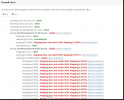
This is the result of the firewall check:
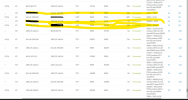
Below is a packet capture showing the first test for port 5060 mapping to 38240, as you can see the packet goes to IP 34.141.156.185 on port 5060 but the reply comes back from IP 192.248.177.74 on port 38420. Also the packets are using the NAT rules in place as per the article
Anyone can help on this
The firewalls we use are Sonicwall TZ 670
I have checked the following article to make sure the NAT rules are in place : https://www.3cx.com/docs/sonicwall-firewall-configuration/
I also have asked Sonicwall to confirm that the issues are not related to the Sonicwall
This is the result of the firewall check:
Below is a packet capture showing the first test for port 5060 mapping to 38240, as you can see the packet goes to IP 34.141.156.185 on port 5060 but the reply comes back from IP 192.248.177.74 on port 38420. Also the packets are using the NAT rules in place as per the article
Anyone can help on this