Self Mosted - Migrate to Hosted or STARTUP?

Status
Not open for further replies.

MCCDCHS

Customer
Joined
Jul 17, 2019
Messages
59
Reaction score
6
Hi!

I'm triing to find out about Hosted vs STARTUP. We have a Enterprise license and 54 current Extensions, but only need a 8SC connection.

What solution should be move to? All phones run from a SBC. so no STUN. T58A/W Phones.

Is STARTUP replacing Hosted? Its not very clear to me.
 
You'll want to move to hosted. Startup will have limits on number of extensions - 20 max with Pro.

At this time StartUP has not been announced to replace Hosted.
 
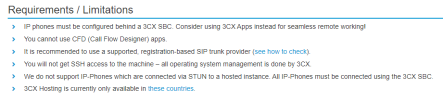
Just make sure you're okay with losing some features since Hosted has restrictions.
 
Hosted has restrictions
There was a page for this but it seems 3CX has taken down that entire web site (per a recent thread). Linking in case they change their minds.
 
Last edited by a moderator:
  • Like
Reactions: Evolute IT
Last edited by a moderator:
Cool, I found stun works Okay but the troubles when it doesn't wasn't worth it. So, I put an SBC at each site and solved.
SSH access isnt needed if they host it. Cool hands off not my problem.
Don't use call flow designer, I found it more trouble to use then just doing it myself, literally took me less time to map out my own routes and setup then using the designer.
and I'm in that country list

My SIP Trunk isnt on the preferred list, but it works in my current instance, if I restore my Backup into the Hosted solution, do you think it will work?

Also My phones are pointed at a different provisioning URL, how do I point all the phones to the new one?

IF I restore my Enterprise license key into the hosted solution, will they both work side by side until the conversion is done or will my instance stop working immediately? (It says you get a fail over would this be the fail over?)
 
Last edited:
Here you require a dedicated hosted instance and not a startup version, for the amount of extensions, and from the rest of your descriptions it all seems fine, except the VoIP provider, this will not be supported and can’t not advise upon it. So the advice here is to switch to a supported provider. Regarding the fqdn, and as long as it is a 3cx fqdn, the public ip address will be automatically updated when the system is moved.
 
IF I restore my Enterprise license key into the hosted solution, will they both work side by side until the conversion is done or will my instance stop working immediately? (It says you get a fail over would this be the fail over?)
 
IF I restore my Enterprise license key into the hosted solution, will they both work side by side until the conversion is done or will my instance stop working immediately? (It says you get a fail over would this be the fail over?)
It is not recommended to run both system at the same especially with registration based VoIP providers as once restored the trunk will register to new system, and any case once services start on the new system the fqdn ip will be updated to new systems ip address immediately. This is not though like failover, which needs to be enabled first and where the passive servers services are actually stopped. You can though configure failover, after deployment setting your self hosted instance as the passive and 3cx hosted as active, this shoukd be fine. Although please check the guide: https://www.3cx.com/docs/failover/
 
Status
Not open for further replies.

Forum statistics

Threads
111,974
Messages
590,081
Members
164,899
Latest member
mazet