Send Fax via E-Mail

ZeBuS

SOHO User
Joined
Sep 12, 2022
Messages
2
Reaction score
0
Hi everyone,

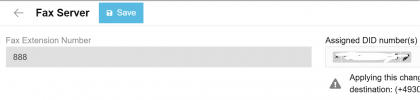
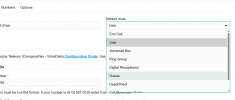
I’m having an issue with the "Send Fax via E-Mail" option — it doesn’t appear in the dropdown menu in my 3CX v.20 onpremise.
The Fax server is properly configured and everything should be working, but I still can’t receive faxes.

My provider is Telekom, which supports T.38, and with version v18 the fax worked without any problems. Since the update, this option is no longer available and I can’t figure out why.

Does anyone know why the “Send Fax via E-Mail” option might be missing and how to enable it?
Any hints or similar experiences would be greatly appreciated.

Thanks in advance!Screenshot 2025-08-11 111636.png
 

Attachments

  • Screenshot 2025-08-11 112117.png
    Screenshot 2025-08-11 112117.png
    27.8 KB · Views: 4
Hi go to the pbx admin console ----- advanced ----- fax ---- add ---- add fax forward

There you can forward faxes to a specific user, or just use the global fax server.

1754915057657.png


Also, validate that the SMTP is working in the system to receive these emails.

Have a good day!
 
Hi go to the pbx admin console ----- advanced ----- fax ---- add ---- add fax forward

There you can forward faxes to a specific user, or just use the global fax server.

View attachment 48915


Also, validate that the SMTP is working in the system to receive these emails.

Have a good day!
Hi Alejandro,

I tried what you suggested, but it didn’t work, because it forces me to set a default route on the trunk and doesn’t let me select it without the fax server’s extension or “send via fax.”

Only by setting it to call an external number and making that number the fax server’s extension does it work. In the end, I managed to get it working by selecting “external call” as the default route in the trunk and then manually entering the fax server’s extension there.
 
If it's a single number Trunk, you can also cut off the last digit from the main trunk number then add a DID with the full number. This way the default route gets skipped because trunk number lacks the last digit. The call then gets relayed to the (full-length)-DID which can be assigned to the fax.
 
Hi Alejandro,

I tried what you suggested, but it didn’t work, because it forces me to set a default route on the trunk and doesn’t let me select it without the fax server’s extension or “send via fax.”

Only by setting it to call an external number and making that number the fax server’s extension does it work. In the end, I managed to get it working by selecting “external call” as the default route in the trunk and then manually entering the fax server’s extension there.
Yes, if you only have one DID then the workaround is put any number as the main trunk number that does not match the DID, then you can add the DID in the fax server.
 
  • Like
Reactions: KyriacosS_3CX

Forum statistics

Threads
111,956
Messages
589,928
Members
164,860
Latest member
maxpcc