send Welcome email

Status
Not open for further replies.

nicoonline

SOHO User
Joined
Jul 4, 2019
Messages
54
Reaction score
6
I have created 2 users with Microsoft365 synchronization. The email address is correctly synchronized. I tried to send the welcome email but the email does not seem to be sent.

I have checked that it is not caught by our anti-spam and I have not seen any evidence of smtp calls.

How can I debug on the 3cx itself?
 
How comfortable are you using Wireshark to analyze packet data?

This simplest way that I've found is to log in to the 3CX PBX console and do the following:
  1. Right-click on the Activity Log button on the Dashboard page and choose Open Link In New Window (yes, you need to 2 windows).
  2. Click on the Capture button on the Activity Log page in the new window,
  3. Go back to the original window and send a welcome email to a user,
  4. Once the email has sent, go back to the Activity Log page/window and click on the Stop button to complete the data capute,
  5. Click on the link to save the capture data to your computer and then click on the OK button to close the Network Capture dialog,
  6. You can now log out of the PBX if you aren't going to do anything else,
  7. Open the dump,pcap file (or whatever you called it) in WireShark,
  8. In the Search bar of WireShark, type DNS and hit enter to show only the DNS queries,
  9. If the email has been sent then you should see DNS entries listed that show "Standard query" in the Info column showing a lookup for the SMTP server,
  10. You can also do a search for "Client Hello" (tls.handshake.type == 1) (This assumes that the connection is being made over TLS which it really should for security),
  11. If it is present, check the data and see if the PBX tried talking to an SMTP server.
Good luck.
 
Hello,

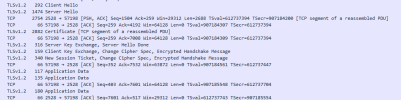
Yes i see a complete conversation.

1667809486934.png
 
Which SMTP server are you using in 3cx? We see port 2528 here, so assuming 3cx SMTP server, correct? When you created the extension with the email address, how long did you wait between settings up the mailboxes in 365 and extensions in 3cx?

Your capture snip-it here shows no FIN ACK responses, but I doubt this is your issue. It's more likely that the extensions were set up with the email before the mailboxes in 365 could receive email, and the emails sent upon extension creation or when adding emails to extensions have bounced, and now the email addresses are blackisted on the 3cx SMTP.
 
Last edited:
Hello Charles,

Thanks for your reply. your feedback seems good. How can we deblacklist the email ?
Normally the extension was created after the mailbox but i'm not sure.
 
Which SMTP server are you using in 3cx? Yes
We see port 2528 here, so assuming 3cx SMTP server, correct? Yes
 
Thanks for the reply. Please ensure that when creating new extensions with email addresses, the mailbox is ready to receive emails.

When creating extensions, a welcome email is sent to the specified email address using the 3cx SMTP server, and if the email can not be received and bounces, the address is blocked indefinitely.

If you have M365, you may also use this as your SMTP server first configuring the integration as per the guide: https://www.3cx.com/docs/manual/microsoft-365/.
 
Last edited:
Hello,
Thanks Charles.
M365 integration is already configured & deployed.
how can i change the smtp ?
 
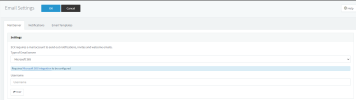
It is changed from the management console Settings > email section

1667892880623.png


Choose Microsoft 365 from the drop and enter the email address. Then press OK.
 
  • Like
Reactions: Charles_3CX
You are welcome.
 
Status
Not open for further replies.

Forum statistics

Threads
111,974
Messages
590,081
Members
164,899
Latest member
mazet