Separate Office Hours for Ring Group

Status
Not open for further replies.

Daniel_AU

Free User
Joined
Nov 5, 2018
Messages
14
Reaction score
2
We have a ring group that requires separate office hours. I have created a dummy extension (no handset) with these office hours that forwards to the ring group or forward to voicemail depending on the hours of the day.

However this does not seem to work. If it is out of hours the calls still forward to the ring group and do not go to voice mail.

Is there something I have done wrong? Does the face that the extension is unregistered override the office hours?
 
Can you let us see screen capture of your time settings everywhere you set something?
Are you in V15.5 or V16?
what is your usual call flow scenario?
 
Last edited:
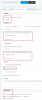
have you enabled Auto-Switching on the dummy ext. so that it will send calls in one destination when Status = Available and another Destination when DND ?

It should look like this under Available since the extension is always unregistered, in order to route calls correctly for both internal and external calls.

Same thing goes for DND Status, but you forward to your voicemail instead.

10310

In the Auto Switch, you can set specific hours also if needed (to prevent dummy from going to AWAY Status during break times in case your Global hours have breaks)
 
Last edited:
I have configured exactly as you have demonstrated however, even when out of hours the calls still forward to the ring group.

We do not use the Global Office hours, our office is manually open and closed.
 
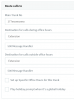
Does your trunk send the calls to the dummy extension or is it set to send them directly to the RG?

- Check your inbound rules too if you have set any, the calls should always end up on the dummy extension in all scenarios.

- Ensure the status of the dummy extension is currently set to available (Lunch and Business Trip prevent auto switching in case they have been set manually)

- Also check the time on the PBX and timezone to ensure the auto switching follows the hours you have selected.

10325
 
There is no DID attached to this, i'm currently doing this on internal extensions only. No inbound rules.

Timezone is set correctly and so is the server time. Verified by looking at the call logs.

Question..
  • what is the best way to check or change the status of an extension? I have been logging into the web client.
  • is there a delay after changing the extension auto switch times, or should the extension reflect these changes instantly?
 
Where does your trunk point to though? (see my previous screenshot)
  • Dashboard > Extensions > Pick one > Click status

  • Yes there is a delay, the auto switch will take place at the next Opening hours or the next closing hours, whichever comes first. Set the extension manually to Available to begin with and let it switch according to the schedule you defined.
 
Ah, that's where i'm going wrong. I have been changing the times for the extension thinking it have affect right away. If I manually change the status of the extension it works as desired.
 
  • Like
Reactions: JohnS_3CX
Status
Not open for further replies.

Forum statistics

Threads
111,921
Messages
589,746
Members
164,796
Latest member
Dame24